

Key takeaways
- Three small-form-factor gaming desktops that ship with 32GB of RAM, from a palm-sized mini PC to a compact tower with a discrete graphics card.
The real decision with a compact gaming desktop is not whether 32GB of memory sounds generous. It is whether that memory arrives already installed, in the configuration the listing actually names, inside a box small enough for the desk, shelf, or living-room cabinet you have in mind. Buyers get caught when a listing family offers several memory sizes and the small headline number belongs to a different variant, or when a mini PC looks tiny in photos yet still needs an external power brick and a clear patch of desk for its cables.


This shortlist is for players who want a ready-built machine rather than a parts project: someone downsizing from a tower, someone gaming at a shared desk, or someone putting a PC beside a television. Every pick below was chosen because its own Amazon product page names 32GB of RAM and a small-form-factor or mini PC design, and each one approaches that brief from a different angle.
Quick Picks
As an Amazon Associate we earn from qualifying purchases.
| Product | Best for | Key spec from title |
|---|---|---|
| GMKtec Nucbox K6 | A tiny box that can hide behind a monitor | 32GB DDR5 (16GB x 2), 1TB PCIe 4.0 SSD |
| ASUS ROG G22CH DB779 | Players who insist on a discrete graphics card | NVIDIA GeForce RTX 4070, 32GB DDR5 RAM |
| GMKtec Nucbox K11 | A mini PC with an OCuLink port for later graphics expansion | 32GB DDR5 RAM, Dual NIC 2.5GbE LAN |
How to Choose
Start With the Graphics, Not the Processor Name
Graphics decide what a compact gaming PC can actually do once a game loads, and the gap inside this category is wide. A discrete card such as the GeForce RTX 4070 in the ASUS machine below is a separate graphics processor with its own memory, built for demanding titles at higher settings. An integrated solution such as the AMD Radeon 780M in the GMKtec boxes shares the system memory and suits lighter competitive games, older libraries, and everyday titles at modest settings. Neither answer is wrong. What matters is matching the graphics type on the listing to the games you already own, instead of assuming that a fast-sounding processor name guarantees the frame rates you expect from a large tower.
Confirm the 32GB Configuration on the Exact Listing
Memory is where compact desktops quietly differ from one another. One listing may install 32GB as two 16GB modules in dual channel, which is the arrangement the GMKtec K6 names in its title, while another reaches the same total differently or reserves some slots for later upgrades. Read the style or configuration line on the product page and check that the 32GB option is the one selected before you compare anything else. Also note whether the memory can grow later. The K6 listing describes expansion beyond its installed memory, while a sealed or soldered design would fix your ceiling on the day you buy, with no second chance to add capacity.
Measure the Space, Including the Brick and the Cables
Small-form-factor covers everything from a four-inch cube to a compact tower that still stands upright on a desk, so the label alone tells you little. Work from the dimensions printed on the listing. The K6 measures 4 x 4 x 2 inches, small enough to mount behind many monitors, whereas the ASUS is a small-form-factor desktop in the tower sense and needs genuine desk or floor room. Then leave space for what photos crop out: an external power supply on most mini PCs, display cables that bend stiffly, and airflow around vents. A machine that fits on paper but suffocates inside a closed cabinet will throttle or grow loud exactly when a game gets busy.
Count Ports Against the Setup You Already Own
Compact cases trade port variety for size, and the shortfall usually appears on setup day. List what you plug in now: one or two monitors, a wired network drop, a headset, a controller receiver, an external drive for your game library. The GMKtec models below lean into this with dual 2.5Gbps LAN ports and USB4 connections, while the K11 adds an OCuLink port, a path toward an external graphics dock later. Check the display outputs against your screens as well, because a box offering HDMI, DisplayPort, and USB-C video covers far more monitor combinations than one relying on a single output and an adapter you have not bought yet.
The 3 Best Options
GMKtec Nucbox K6
This is the pick for someone whose desk cannot spare tower space at all. Its listing calls the K6 a small form factor desktop micro mini computer, and the hardware inside is a proper gaming APU combination: a Ryzen 7 7840HS processor with Radeon 780M graphics, which the listing describes as RDNA 3 graphics with twelve cores. The installed memory is exactly the configuration this guide requires, 32GB of DDR5 in two modules, and storage starts at 1TB with room described for a second drive. Dual LAN ports and USB4 make it unusually flexible for a box this small, suiting a player who games at the desk, streams media to a television, and keeps a wired connection for both.
Specs
- Processor: AMD Ryzen 7 7840HS (8C/16T, up to 5.1GHz)
- Graphics: AMD Radeon 780M 12 cores
- Memory: 32GB DDR5 5600MHz dual channel (16GB x 2), expandable to 64GB
- Storage: 1TB PCIe 4.0 M.2 2280 SSD, dual slot expansion
- Networking: Dual NIC LAN 2.5Gbps, WiFi 6E, Bluetooth 5.2
- Ports: USB4.0, HDMI, DisplayPort, USB-C
- Operating system: Windows 11 Pro
- Dimensions: 4 x 4 x 2 inches; weight 3.48 pounds
Best for: Desk setups where the PC must disappear behind a monitor while still handling mainstream gaming.
Watch out for: Graphics are integrated and share system memory, so demanding new releases will need reduced settings compared with a discrete card.
ASIN: B0CQ4WBV8L
ASUS ROG G22CH DB779
Choose this one when the compact footprint matters but integrated graphics do not. The listing presents the G22CH as a small form factor gaming desktop, and it pairs an Intel Core i7-13700KF processor with a discrete NVIDIA GeForce RTX 4070, the strongest graphics hardware in this shortlist by a clear margin. The specified configuration carries 32GB of DDR5 RAM and a 1TB Gen 4 SSD, so the memory requirement is met in the exact style named on the page rather than through a smaller sibling variant. It behaves like a conventional gaming tower that has been shrunk, which also means it asks for conventional tower room, power, and ventilation rather than a corner of a bookshelf.
Specs
- Processor: Intel Core i7-13700KF
- Graphics: NVIDIA GeForce RTX 4070
- Memory: 32GB DDR5 RAM
- Storage: 1TB SSD Gen 4
- Design type listed: Mini PC, small form factor
- Model number: G22CH-DB779
- Operating system: Windows 11
Best for: Players downsizing from a tower who still play demanding titles and refuse to give up a discrete graphics card.
Watch out for: It is small only by tower standards, so measure your space against the listing dimensions instead of expecting mini PC proportions.
ASIN: B0C4Y9SXX4
GMKtec Nucbox K11
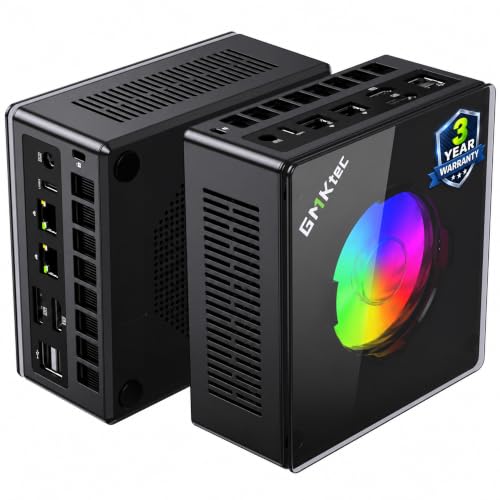
The K11 suits a buyer who wants mini PC convenience today and a graphics escape route tomorrow. Its listing names a Ryzen 9 8945HS processor and 32GB of DDR5 RAM with a 1TB SSD in this configuration, and the port that sets it apart is OCuLink, a connection used for external graphics docks that the smaller K6 does not offer. Around that sit dual 2.5GbE LAN ports and two USB4 connections, so the machine doubles comfortably as a home server or a busy workstation between gaming sessions. Treat the integrated graphics as your starting point for lighter play, and the OCuLink port as the reason this model exists: a planned upgrade path rather than a dead end.
Specs
- Processor: AMD Ryzen 9 8945HS (8C/16T, up to 5.2GHz)
- Memory: 32GB DDR5 RAM
- Storage: 1TB SSD in this configuration
- Expansion: OCuLink port
- Networking: Dual NIC 2.5GbE LAN, WiFi 6
- Ports: HDMI, DisplayPort, USB4 x 2, USB 3.2, USB-C 4.0
- Bluetooth: 5.2
- Model number: K11
Best for: Buyers who want a compact everyday gaming box now, with an OCuLink route to stronger graphics later.
Watch out for: The external graphics dock that OCuLink enables is a separate purchase, and the box itself relies on integrated graphics until you add one.
ASIN: B0DPGDSM92
Which One Fits Your Situation
Your Desk Is Shared and Space Is Negotiable No Longer
Pick the GMKtec Nucbox K6. At 4 x 4 x 2 inches it can sit behind a monitor or on a shallow shelf, which removes the daily argument about whose workspace the tower is eating. Its 32GB of dual-channel DDR5 and 1TB drive cover a mainstream game library without upgrades, and the Radeon 780M handles lighter and older titles well. Accept the integrated graphics compromise as the price of the footprint, and this becomes the easiest machine here to live with in a small room.
You Play New, Demanding Games and Settings Matter
Go straight to the ASUS ROG G22CH. It is the only option here with a discrete GeForce RTX 4070, and that single fact outweighs every convenience the mini PCs offer if your library leans on recent, graphics-heavy releases. You still get the 32GB of DDR5 the brief calls for, in a chassis the listing describes as small form factor. Just plan its placement like a real tower, with ventilation and cable room, rather than tucking it into furniture.
You Want One Small Box for Work, Media, and Play
The GMKtec Nucbox K11 fits a mixed household role best. Dual wired networking, two USB4 ports, and a 1TB drive make it credible as a home server or family workstation during the day, while its Ryzen 9 processor and 32GB of memory keep gaming sessions comfortable in the evening. The OCuLink port also means a future graphics dock can join the setup without replacing the whole computer, which suits buyers who upgrade in stages instead of all at once.
You Move Between Rooms or Homes Often
Take the K6 again, and for a simple reason: at 3.48 pounds with a two-inch profile, it travels in a bag pocket alongside its power supply, then reconnects to whatever screen waits at the other end. A student moving between a dorm and home, or a player splitting time between two households, will feel that difference weekly. The K11 is also portable, but its appeal is the expansion port, which matters less when the machine itself keeps changing rooms.
Common Mistakes
- Assuming every variant under one listing title has 32GB, when the memory size changes with the selected style or configuration.
- Comparing a discrete graphics card with integrated graphics as if the processor names make them equivalent.
- Measuring only the case and forgetting the external power supply, stiff display cables, and ventilation clearance.
- Buying a mini PC for a closed television cabinet without checking how its vents breathe in that space.
- Paying for expansion ports you will never use, or skipping the one port, such as OCuLink, that your upgrade plan depends on.
Frequently Asked Questions
Is 32GB of RAM enough for gaming on a compact desktop?
For the machines in this guide, yes, in the sense that memory capacity stops being the limiting factor for typical gaming sessions that also run a browser, voice chat, and a launcher in the background. What will limit you first on the mini PCs is graphics, not memory. The discrete-card ASUS uses its 32GB differently again, supporting heavier multitasking alongside demanding games. Check the exact configuration on the listing, because the total only helps if it is actually installed in the variant you order.
Can a mini PC with integrated graphics really play games?
It can, within honest limits. The Radeon 780M named in the GMKtec listings is a capable integrated solution aimed at lighter competitive titles, older releases, and mainstream games at reduced settings and resolutions. It is not a substitute for a discrete card when a new release pushes high settings. Read the graphics line on the listing before buying, and match it to your library: a player devoted to esports titles and back-catalogue games will be satisfied, while someone chasing the newest releases should choose the ASUS or plan around the K11 and its OCuLink port.
What does small-form-factor actually mean for placement?
It is a range, not a standard size. In this guide it stretches from a 4 x 4 x 2 inch mini PC to a compact tower that still needs desk or floor space and airflow. That is why the dimensions on each listing matter more than the label. Measure the shelf, cabinet, or desk corner you intend to use, add room for the power supply and cable bends, and leave vents unobstructed. A machine that fits tightly on day one often runs hot and loud once summer arrives or dust builds up.
Should I choose dual-channel memory in a mini PC?
When a listing offers it, dual-channel memory is worth preferring, particularly with integrated graphics. The K6 installs its 32GB as two 16GB DDR5 modules, and integrated graphics draw on that same system memory, so the arrangement supports both the processor and the graphics at once. A single-module layout reaching the same total can leave performance on the table in exactly the gaming workload these machines are bought for. The listing states the configuration plainly, so there is no reason to guess: read the memory line and confirm the module layout before ordering.
More from Amazon
Programs that pair well with the guide above. Offers and eligibility are set by Amazon and may change.
Set up recurring deliveries of everyday items on eligible products. Terms and savings are set by Amazon.
Explore Subscribe & SaveFree shipping on eligible items, Prime Video and more. Eligible new members can start with a free trial.
Start a Prime free trialAudiobooks and podcasts to listen to on the go. Eligible new members can start with a free trial.
Try Audible freeRead from a large library of eBooks and audiobooks on any device. Check Amazon for current plans.
Explore Kindle UnlimitedAs an Amazon Associate we earn from qualifying purchases.


Write Your Review
No reviews yet. Be the first to share your experience!