

Key takeaways
- Compare the best air-cooled workstation desktops with pcie expansion slots for CAD, rendering and simulation, all with room for extra cards and drives.
Plenty of buyers want workstation reliability without a liquid cooling loop to maintain. Air cooling keeps the plumbing out of the case, makes field service simpler, and suits offices where a pump failure or a coolant leak would be a serious problem. The catch is that many headline workstation towers are now sold in liquid-cooled configurations, so finding a genuinely air-cooled machine with real expansion room takes some care.
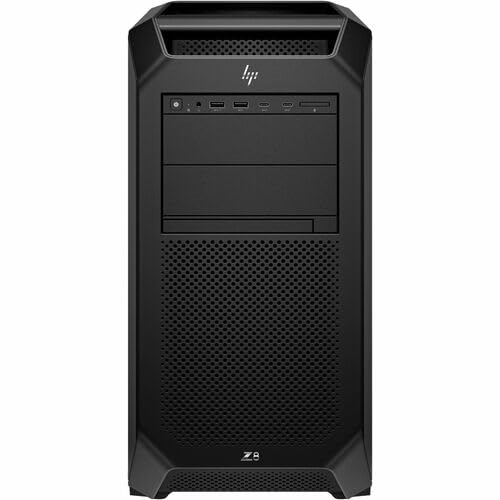

This guide covers five air-cooled workstation desktops that all offer proper PCIe expansion slots for graphics cards, capture hardware, fast networking and storage controllers. Every pick is a single-processor tower from a major workstation line, cooled by fans and heatsinks rather than a radiator loop, and each one leaves at least one full-length slot free for the card you plan to add next year. They differ in core count, memory ceiling and slot count, so the right choice depends on how far your workload will grow.
As an Amazon Associate, we earn from qualifying purchases.
Quick answer
The Lenovo ThinkStation P3 Tower Gen 2 is the best pick, pairing a 24-core Intel Core Ultra 9 285 processor and 64GB of DDR5 memory with four PCIe slots and air cooling. Teams planning graphics cards in multiples should look at the HP Z8 Fury G5. The HP Z4 G5 suits ECC memory growth, and the Dell Precision 3660 fits buyers who want a Core i9 tower with graphics fitted.
How to choose
Cooling method comes first in this category. Confirm that the exact configuration you are ordering uses air cooling, because several workstation families offer a liquid-cooled variant of the same chassis. An air-cooled build moves heat with a large CPU heatsink, case fans and directed airflow paths. It gives up a little thermal headroom on the very highest wattage processors, but it removes pump wear, coolant and leak risk from the maintenance picture entirely.
Slot count and slot wiring matter more than the raw number printed in a brochure. A graphics card needs a full-length x16 slot with x16 electrical lanes for full bandwidth. Secondary slots are often wired for x8 or x4 lanes even when the connector is x16 long, which is fine for network adapters, capture cards and storage controllers but worth knowing before you plan a second GPU. Count the slots that remain usable after a wide dual-slot graphics card covers its neighbour.
Memory headroom decides how long the machine stays useful. Entry towers with four DIMM slots top out at 128GB or 256GB, while Xeon W platforms with eight or sixteen slots reach 512GB or far beyond, and they support ECC registered modules that correct memory errors during long renders and simulations. If your datasets are growing, buy the platform with the higher ceiling even if you populate only part of it on day one.
Power supply capacity limits future cards. A tower with a 500-watt supply handles one modest professional GPU, while multi-card plans need 1,000 watts or more plus the right power connectors. Check the supply fitted to the exact listing, not the maximum the chassis can accept, and leave headroom for every card and drive you intend to add.
Finally, look at physical access. Tool-less side panels, front-accessible drive bays and clear airflow paths make upgrades and dust cleaning far easier, which matters on an air-cooled machine that will live under a desk for years. Front USB and a card reader are small details that save daily friction in a busy studio.
Lenovo ThinkStation P3 Tower Gen 2 — best overall
The ThinkStation P3 Tower Gen 2 is the most balanced machine in this roundup. It runs an Intel Core Ultra 9 285 vPro processor with 24 cores, backed by 64GB of DDR5 memory in the listed configuration, and the platform accepts up to 256GB across four DIMM slots. Storage on the listed build is a 1TB NVMe solid state drive on the fast PCIe Gen 5 interface, and the W880 chipset brings workstation features such as ECC memory support with compatible modules and Intel vPro management for IT teams.
Expansion is where the P3 Tower Gen 2 earns its place here. The 27-litre tower provides four PCIe slots: one PCIe 5.0 x16 slot for the graphics card, one PCIe 4.0 x16 connector wired for x4 lanes, and two open-ended PCIe 3.0 x1 slots for smaller cards. That layout covers the common upgrade path of a professional GPU plus a capture card or a fast network adapter, and the open-ended x1 slots accept longer cards when bandwidth demands are modest. Lenovo rates power supply options up to 1,100 watts, so higher-draw graphics configurations are supported within the same chassis.
Cooling is entirely by air, with a front-to-back airflow design and no liquid option in this line to confuse the order. For CAD seats, product design teams and developers who want current-generation parts, certified drivers and room to grow without moving to a Xeon platform, this is the tower to buy first.
Key specs
| Item | Detail |
|---|---|
| Processor | Intel Core Ultra 9 285 vPro, 24 cores |
| Memory | 64GB DDR5 as listed, up to 256GB, 4 slots |
| Storage | 1TB NVMe PCIe Gen 5 SSD |
| Expansion | 4 PCIe slots, incl. 1 PCIe 5.0 x16 |
| Chipset | Intel W880 |
| Cooling | Air cooling, front-to-back airflow |
HP Z8 Fury G5 — best for multi-card expansion
The Z8 Fury G5 is the expansion heavyweight of this group. HP builds it around a single Intel Xeon W processor on the W790 platform, and the listed configuration carries a 24-core Xeon w7-3545 with 16GB of DDR5 ECC registered memory and a 512GB NVMe SSD. Those as-listed capacities are modest, but the platform behind them is anything but: sixteen DIMM slots accept up to 2TB of ECC memory, and the chassis supports up to four high-end graphics cards for GPU rendering, visualisation and model training work.
The slot layout is the headline. Eight PCIe slots give you room for several double-width cards plus networking and storage controllers, and four front-accessible NVMe bays let you swap fast storage without opening the case. Power supply options run up to a 2,250-watt aggregate unit on the largest builds, which is what makes multi-card configurations practical rather than theoretical.
All of that performance is air-cooled. HP moves air through the large tower with a bank of fans and keeps the design serviceable with tool-less access, which suits render nodes and simulation seats that run hot for long stretches and need occasional manual maintenance. Buy the Z8 Fury when the upgrade plan already includes a second, third or fourth card, and when memory growth well past half a terabyte is a real possibility rather than a wish.
Key specs
| Item | Detail |
|---|---|
| Processor | Intel Xeon w7-3545, 24 cores |
| Memory | 16GB DDR5 ECC as listed, 16 slots, up to 2TB |
| Storage | 512GB NVMe SSD as listed, 4 front NVMe bays |
| Graphics | NVIDIA RTX 2000 Ada 16GB in the listed build family |
| Expansion | 8 PCIe slots, room for up to 4 graphics cards |
| Cooling | Air cooling, tool-less access |
HP Z4 G5 — best for ECC memory growth
The Z4 G5 is HP’s mainstream Xeon W tower, and it hits a sweet spot for engineering teams that care about memory integrity and steady expansion. The listed configuration pairs a 12-core Intel Xeon w5-2455X processor with 32GB of DDR5 ECC registered memory and a 512GB SSD. Eight DIMM slots take the platform to 512GB of ECC memory, which is the main reason to choose it over a Core-based tower: long simulations, large assemblies and virtual machines all benefit from error-correcting memory that keeps running instead of crashing on a flipped bit.
Expansion runs to five PCIe slots, led by two full-length Gen 5 x16 slots for graphics cards, with additional slots for storage and network hardware. That is enough for a dual-GPU visualisation seat or a single GPU plus a high-speed network adapter and a capture card. Power supply options reach 1,125 watts on higher configurations, and the listed build sits comfortably below that ceiling with room to add a stronger card later.
Cooling is air-based across the Z4 G5 line, with a heatsink and fan arrangement designed for sustained loads in office environments. HP also layers on its management and security tooling, which matters for fleets deployed across a studio or a lab. Choose the Z4 G5 when ECC memory and a long, calm upgrade path matter more than the highest core counts in this roundup.
Key specs
| Item | Detail |
|---|---|
| Processor | Intel Xeon w5-2455X, 12 cores |
| Memory | 32GB DDR5 ECC as listed, 8 slots, up to 512GB |
| Storage | 512GB SSD as listed |
| Chipset | Intel W790 |
| Expansion | 5 PCIe slots, incl. 2 Gen 5 x16 |
| Cooling | Air cooling |
Dell Precision 3660 Tower — best Core i9 tower with graphics fitted
The Precision 3660 is the pick for buyers who want a fast tower that arrives ready for graphics-heavy work. The listed configuration runs a 24-core Intel Core i9-13900 processor with 64GB of memory, a 2TB NVMe SSD and an NVIDIA RTX A4000 graphics card with 16GB of GDDR6 memory. That combination suits CAD, 3D modelling and video work where single-thread speed and a capable certified GPU matter more than ECC memory or extreme core counts.
Expansion covers three full-height PCIe slots, including a Gen 5 x16 slot for the graphics card, so there is room for a capture card or a faster network adapter alongside the fitted GPU. The chassis supports power supplies up to 1,000 watts on higher configurations, and Dell’s front intake design feeds the air cooling with fresh air from the front panel. Because the 3660 uses Intel Core processors, memory is non-ECC DDR5, which is the main trade against the Xeon towers in this guide.
Serviceability is good, with a swing-out power supply arrangement on many builds that makes reaching the motherboard far easier during upgrades. For a single-seat professional who wants strong out-of-box performance, certified graphics drivers and a clear, simple air-cooled design, the Precision 3660 is the straightforward choice.
Key specs
| Item | Detail |
|---|---|
| Processor | Intel Core i9-13900, 24 cores |
| Memory | 64GB DDR5 as listed |
| Storage | 2TB NVMe SSD as listed |
| Graphics | NVIDIA RTX A4000 16GB GDDR6 |
| Expansion | 3 full-height PCIe slots, incl. 1 Gen 5 x16 |
| Cooling | Air cooling, front intake design |
Lenovo ThinkStation P3 Tower — best entry point
The first-generation ThinkStation P3 Tower is the sensible way into this category when the budget has limits but the expansion requirement does not. The listed configuration runs a 14-core Intel Core i5-14500 vPro processor with 16GB of DDR5 memory and a 512GB SSD, on the Intel W680 chipset. It relies on integrated Intel UHD Graphics 770 for display output, which is exactly why it belongs in a guide about expansion slots: the full-length PCIe 4.0 x16 slot sits empty and ready for the professional graphics card you add when the workload demands it.
Alongside the x16 slot there are three further PCIe slots, including a second long connector wired for x4 lanes and two x1 slots, so a network adapter or capture card can join the graphics card later. Memory grows to 128GB across four DIMM slots, with ECC support when paired with compatible modules and processors, and power supply options run to 1,100 watts on this chassis family, which leaves genuine headroom for a mid-range GPU upgrade.
Cooling is by air throughout the P3 Tower line. For offices equipping several CAD or development seats, this pattern of buying a modest tower now and adding cards over time keeps the fleet uniform and the upgrade path predictable. It is the least powerful machine here as listed, and also the most honest about what it is: a well-built base with its best years ahead of it.
Key specs
| Item | Detail |
|---|---|
| Processor | Intel Core i5-14500 vPro, 14 cores |
| Memory | 16GB DDR5 as listed, up to 128GB, 4 slots |
| Storage | 512GB SSD as listed |
| Graphics | Integrated Intel UHD Graphics 770, x16 slot free |
| Expansion | 4 PCIe slots, incl. 1 PCIe 4.0 x16 |
| Cooling | Air cooling |
Who should skip
Skip this whole category if your software is licensed or certified only on a specific vendor platform that none of these towers match, or if your workloads run on macOS, since every machine here is a Windows or Linux workstation. Gamers should also look elsewhere: professional graphics cards and workstation processors are tuned for certified drivers and stability, not frame rates, and a consumer desktop will play better for the same money.
Skip air cooling itself if you plan to run the highest wattage processors at full load around the clock in a hot room. Liquid-cooled variants of these workstation families hold boost clocks longer in those conditions, at the cost of the maintenance this guide is trying to avoid. Finally, skip the entry-level pick if you already know you need ECC memory at high capacity or more than one graphics card; buying the bigger platform once is cheaper than replacing a tower in two years.
Frequently Asked Questions
Are air-cooled workstations loud under load?
They are audible under sustained load, because fans must move enough air to cool the processor and graphics card without a radiator. Office-grade towers from HP, Dell and Lenovo use large, slow-turning fans and tuned fan curves, so the sound is a steady airflow noise rather than a high-pitched whine. Noise rises with ambient temperature, so a cool room and clear vents make a real difference.
Can I add a second graphics card to these towers?
On the larger platforms, yes. The HP Z8 Fury G5 supports up to four graphics cards, and the HP Z4 G5 has two full-length Gen 5 x16 slots. The Lenovo towers and the Dell Precision 3660 are better suited to one graphics card plus smaller add-in cards, because slot count, lane wiring and power supply capacity all limit a second full-size GPU.
Does an open PCIe slot guarantee a card will fit?
No. Check three things before ordering a card: the physical length and height the chassis accepts, the electrical lanes the slot provides, and whether the power supply offers the connector and wattage the card needs. A wide card may also cover the neighbouring slot, which reduces your usable expansion even though the slot count on paper stays the same.
Is ECC memory worth choosing over a faster processor?
For long renders, simulations, financial models and large datasets, ECC memory protects against silent data errors and crashes that waste hours of compute time. For interactive CAD and general content work, a faster processor usually delivers more visible benefit. The Xeon W towers in this guide offer ECC; the Core-based towers trade it away for higher clock speeds.
Final verdict
Air cooling and real expansion are not a compromise pairing; they are what most workstation buyers actually need. The Lenovo ThinkStation P3 Tower Gen 2 is the default recommendation for its current processor, generous memory ceiling and clean four-slot layout. Step up to the HP Z8 Fury G5 when several graphics cards are part of the plan, choose the HP Z4 G5 for ECC memory growth on a calmer budget, take the Dell Precision 3660 when you want a Core i9 tower with strong graphics already fitted, and use the ThinkStation P3 Tower as the expandable entry point you upgrade over time. Whichever tower you pick, confirm the exact configuration is air-cooled before you order, and leave one slot free for the card you have not thought of yet.
Product and ASIN Reference
| Product | ASIN |
|---|---|
| Lenovo ThinkStation P3 Tower Gen 2 | B0FM4NZN2S |
| HP Z8 Fury G5 | B0FMFH1PTY |
| HP Z4 G5 | B0C3HT4DBZ |
| Dell Precision 3660 Tower | B0D8RZ7HNR |
| Lenovo ThinkStation P3 Tower | B0DPG6PMY4 |
More from Amazon
Programs that pair well with the guide above. Offers and eligibility are set by Amazon and may change.
Set up recurring deliveries of everyday items on eligible products. Terms and savings are set by Amazon.
Explore Subscribe & SaveFree shipping on eligible items, Prime Video and more. Eligible new members can start with a free trial.
Start a Prime free trialAudiobooks and podcasts to listen to on the go. Eligible new members can start with a free trial.
Try Audible freeRead from a large library of eBooks and audiobooks on any device. Check Amazon for current plans.
Explore Kindle UnlimitedAs an Amazon Associate we earn from qualifying purchases.




Write Your Review
No reviews yet. Be the first to share your experience!