

Key takeaways
- Compare the best 17-inch mobile workstations with professional graphics, from RTX A2000 to RTX A4500 models built for CAD, 3D rendering and video work.
A 17-inch mobile workstation is the closest thing to a desktop workstation that still fits in a laptop bag. The best 17-inch mobile workstations with professional graphics pair a large, color-accurate display with an ISV-certified NVIDIA RTX A-series or Quadro GPU, a high-core-count processor, and enough memory to hold large assemblies, timelines, and datasets without constant swapping. They are built for CAD, 3D modeling, rendering, simulation, and video editing, and they carry the driver certification and build quality that professional software vendors expect.
This guide compares three 17-inch mobile workstations that are listed on Amazon US with professional NVIDIA RTX graphics. Each one takes a different approach: one leads with maximum graphics memory, one leads with a 4K display, and one balances a fast processor with a mid-range professional GPU. Use the buying guidance below to match the machine to the software you run every day.
What to Look For in a 17-Inch Mobile Workstation with Professional Graphics
Professional graphics, not gaming graphics. The defining feature of a mobile workstation is a professional GPU such as the NVIDIA RTX A2000, RTX A3000, or RTX A4500. These cards carry ISV certification for applications such as AutoCAD, SolidWorks, Revit, Maya, and DaVinci Resolve, which means the drivers are validated against those programs. They also support features that matter for professional work, including large amounts of dedicated video memory, error-correcting memory on higher-end models, and hardware ray tracing for rendering previews.
Video memory determines scene size. Graphics memory sets a practical ceiling on how large a project can be before performance drops. A 4GB professional GPU handles 2D CAD, light 3D modeling, and HD video editing comfortably. A 6GB card adds headroom for larger assemblies and 4K timelines. A 16GB card is the right choice for complex scenes, large texture sets, GPU rendering, and simulation work where the whole dataset needs to sit on the card.
Processor cores and memory work together. Rendering, simulation, and compilation scale with core count, so a 16-core processor finishes multi-threaded work far sooner than an 8-core chip. Memory matters just as much: 32GB is a solid baseline for professional work, 64GB suits large assemblies and multi-application workflows, and machines that support 128GB give you room to grow. Check whether the memory is user-upgradeable before you buy, since many workstations ship with a single module and an empty slot.
Display quality is a working tool, not a luxury. A 17.3-inch panel gives you room for toolbars, timelines, and reference windows side by side. For color-critical work, look for a high-resolution panel with wide color gamut coverage and strong brightness. A 4K UHD panel shows fine detail in CAD drawings and video timelines, while a 144Hz full HD panel gives smoother viewport motion. An anti-glare coating helps in bright rooms and on location.
Ports, storage, and serviceability. Professional workflows involve external monitors, storage arrays, and peripherals, so Thunderbolt 4, USB-C with DisplayPort, HDMI, Ethernet, and an SD card reader all earn their place. Fast NVMe SSD storage keeps large files loading quickly, and a second SSD slot lets you separate your operating system from project files. A workstation that opens easily for memory and storage upgrades will last longer in service.
Weight and battery expectations. A 17-inch workstation is a portable desktop, not an ultrabook. Expect a machine in the region of six to eight pounds plus a large power adapter, and plan on working near an outlet for heavy rendering. Battery life under load is modest on every machine in this class, so treat the battery as a bridge between outlets rather than a full working day.
The Best 17-Inch Mobile Workstations with Professional Graphics
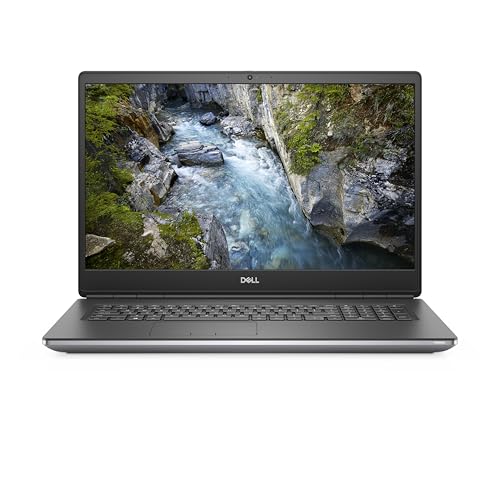
1. Dell Precision 7770 Mobile Workstation
View on Amazon: https://www.amazon.com/dp/B08XZT26WJ
The Dell Precision 7770 is Dell’s flagship 17-inch mobile workstation, and this configuration leads the roundup on graphics memory. The listing pairs a 16-core Intel Core i7-12850HX processor with an NVIDIA RTX A4500 professional GPU carrying 16GB of GDDR6 video memory, which is the largest graphics memory allocation of the three machines here. That combination suits GPU rendering, large CAD assemblies, and simulation work where the dataset needs to stay on the graphics card.
The listing specifications are:
- Display: 17.3-inch full HD anti-glare display
- Processor: Intel Core i7-12850HX, 16 cores, up to 4.8 GHz
- Graphics: NVIDIA RTX A4500 with 16GB GDDR6 video memory
- Memory: 64GB RAM
- Storage: 512GB SSD
- Operating system: Windows 11 Pro
The 64GB of system memory complements the large graphics memory well, letting you keep several professional applications open alongside a browser full of reference material. The Precision 7770 line is known for its serviceability, with room for additional memory and storage, and for Dell’s ProSupport service options. The 16-core processor handles multi-threaded rendering and compilation without strain, and the full HD anti-glare display stays readable in bright site offices and studios.
Who it suits: Engineers, architects, and 3D artists who run GPU-accelerated rendering, simulation, or large-assembly CAD and need the most graphics memory in this roundup.
Considerations: The 512GB SSD fills quickly with large project files and media, so plan on external storage or an internal upgrade. The full HD display is practical rather than color-critical, so pair it with an external monitor for final color decisions. This is also the heaviest class of machine here, so a proper laptop bag and a desk setup matter.
2. Lenovo ThinkPad P17 Gen 2 (20YU001KUS)

View on Amazon: https://www.amazon.com/dp/B09LRGKHBM
The Lenovo ThinkPad P17 Gen 2 is the display-led pick in this roundup. Its 17.3-inch 4K UHD panel shows CAD drawings, timelines, and photographs with far more detail than a full HD screen, and the ThinkPad keyboard and build quality have a long record in professional settings. The listing pairs the 4K display with an NVIDIA RTX A2000 professional GPU, an 8-core Intel processor, and a 512GB SSD.
The listing specifications are:
- Display: 17.3-inch 4K UHD, 3840 x 2160
- Processor: Intel Core i7-11850H, octa-core, 2.50 GHz
- Graphics: NVIDIA RTX A2000 with 4GB dedicated graphics memory
- Memory: 8GB RAM
- Storage: 512GB SSD
- Operating system: Windows 10 Pro
The 4K display is the main reason to choose this machine. Fine lines in drawings stay crisp, video timelines show more tracks at once, and photographs can be judged at full detail without an external monitor. The RTX A2000 is ISV-certified for professional applications, so CAD, 3D modeling, and video editing software run on validated drivers. The ThinkPad’s keyboard, TrackPoint, and MIL-STD-tested chassis suit daily travel between office, site, and studio.
Who it suits: Designers, video editors, and CAD users who value a high-resolution display above all else and work with moderately sized projects.
Considerations: The 8GB of memory is the lowest in this roundup and will limit heavy multitasking, so budget for a memory upgrade if your workflow involves large assemblies or several applications at once. The 4GB of graphics memory suits 2D CAD, light 3D work, and HD editing rather than large GPU rendering jobs. Windows 10 Pro is installed, so confirm your software’s operating system requirements before buying.
3. MSI WS76 Workstation Laptop (11UK-469)

View on Amazon: https://www.amazon.com/dp/B098WF91RQ
The MSI WS76 (11UK-469) is the balanced pick in this roundup, pairing the fastest processor clock speeds here with a mid-range professional GPU and a generous memory and storage configuration. The 17.3-inch 144Hz full HD display gives smooth viewport motion, and the listing includes Thunderbolt 4, Wi-Fi 6E, a TPM 2.0 security chip, and a fingerprint reader.
The listing specifications are:
- Display: 17.3-inch 144Hz full HD, 1920 x 1080
- Processor: Intel Core i9-11900H
- Graphics: NVIDIA Quadro RTX A3000 with 6GB GDDR6 video memory
- Memory: 32GB DDR4 3200MHz RAM
- Storage: 1TB NVMe SSD
- Operating system: Windows 10 Pro
- Connectivity: Thunderbolt 4, Wi-Fi 6E, TPM 2.0, fingerprint reader
The 32GB of memory and 1TB of NVMe storage mean this machine is ready for professional work out of the box, with no immediate upgrades needed. The RTX A3000 sits between the other two graphics cards in this roundup, with enough video memory for larger assemblies, 4K video timelines, and GPU-accelerated effects. The 144Hz display refresh rate makes orbiting and panning in 3D viewports feel fluid, and Thunderbolt 4 supports fast external storage and dual external monitors through a single cable.
Who it suits: Creative professionals and engineers who want a ready-to-work configuration with strong memory and storage, a fast processor, and a professional GPU that handles mid-size 3D and video projects.
Considerations: The full HD resolution shows less detail than the 4K panel on the ThinkPad, so fine-line CAD work may benefit from an external monitor. The machine ships with Windows 10 Pro, so confirm your software’s operating system requirements. As with every 17-inch workstation, the chassis and power adapter add up to a substantial carry weight.
Comparison Table
| Model | Display | Professional Graphics | Processor | Memory | Storage | Operating System |
|---|---|---|---|---|---|---|
| Dell Precision 7770 | 17.3-inch full HD anti-glare | NVIDIA RTX A4500, 16GB GDDR6 | Intel Core i7-12850HX, 16 cores, up to 4.8 GHz | 64GB | 512GB SSD | Windows 11 Pro |
| Lenovo ThinkPad P17 Gen 2 (20YU001KUS) | 17.3-inch 4K UHD, 3840 x 2160 | NVIDIA RTX A2000, 4GB | Intel Core i7-11850H, octa-core, 2.50 GHz | 8GB | 512GB SSD | Windows 10 Pro |
| MSI WS76 (11UK-469) | 17.3-inch 144Hz full HD, 1920 x 1080 | NVIDIA Quadro RTX A3000, 6GB GDDR6 | Intel Core i9-11900H | 32GB DDR4 3200MHz | 1TB NVMe SSD | Windows 10 Pro |
Choosing for Your Use Case
For CAD and engineering. If your daily work is large assemblies in SolidWorks, Revit, or AutoCAD, graphics memory and system memory matter most. The Dell Precision 7770 with its 16GB RTX A4500 and 64GB of system memory is the strongest fit, since large models and simulation datasets benefit directly from the extra headroom. The MSI WS76 is a capable second choice for mid-size assemblies.
For 3D modeling and rendering. GPU rendering scales with graphics memory and CUDA core count, so the Dell Precision 7770 leads again for heavy rendering. For modeling and look development where viewport detail matters, the ThinkPad P17 Gen 2’s 4K display helps you judge geometry and materials without an external monitor. If you render overnight, remember that a laptop chassis will run hot and loud under sustained load, so a cooling stand and a ventilated desk help.
For video editing and motion graphics. Timeline smoothness depends on the GPU, memory, and storage speed together. The MSI WS76’s combination of 32GB of memory, a 1TB NVMe SSD, and the RTX A3000 handles 4K timelines well, and the 144Hz display keeps playback and scrubbing fluid. The ThinkPad P17 Gen 2’s 4K panel is excellent for judging footage, though its 8GB of memory will need an upgrade for serious editing work.
For field work and client presentations. A 17-inch workstation is heavy, so if you carry it daily, a padded backpack with a reinforced base and a compact power adapter matter. The ThinkPad’s build quality and keyboard suit travel, while the MSI’s Thunderbolt 4 port makes it easy to dock at a desk with external monitors. Whichever machine you choose, keep the power adapter in the bag, since heavy professional software drains the battery quickly.
Care and Use
Keep drivers current, but use certified drivers. Professional GPUs rely on ISV-certified drivers, so download graphics drivers from NVIDIA’s professional driver channel or the laptop maker’s support site rather than the gaming driver channel. Update drivers when your main application vendor certifies a new version, and keep a known-good driver version noted in case a new release causes problems.
Manage heat during long renders. Mobile workstations push a lot of heat through a thin chassis. Use the machine on a hard, flat surface, keep the vents clear, and consider a cooling stand for sustained rendering or simulation runs. Clean dust from the vents regularly with compressed air, and avoid running heavy jobs with the lid closed unless the machine is designed for closed-lid operation.
Protect your project files. A single 512GB or 1TB SSD holds the operating system, applications, and active projects, so follow a backup routine from day one. Keep active projects on the internal SSD for speed, archive finished work to external storage, and use cloud backup or a second drive for anything you cannot afford to lose.
Plan memory and storage upgrades early. Two of the machines in this roundup ship with configurations that benefit from an upgrade, particularly the ThinkPad’s 8GB of memory. Check the service manual for the number of memory slots and SSD slots before ordering parts, and buy memory that matches the installed module’s speed and type.
Frequently Asked Questions
What makes a mobile workstation different from a gaming laptop?
A mobile workstation uses a professional GPU with ISV-certified drivers, error-correcting memory on higher-end models, and build quality aimed at sustained professional workloads. Gaming laptops use consumer GPUs tuned for frame rates in games. For CAD, 3D modeling, and video editing, the workstation’s certified drivers and professional features matter more than gaming performance.
How much graphics memory do I need in a 17-inch mobile workstation?
For 2D CAD, light 3D modeling, and HD video editing, 4GB of professional graphics memory is enough. For larger assemblies, 4K video timelines, and GPU-accelerated effects, 6GB gives useful headroom. For complex scenes, large texture sets, and GPU rendering, 16GB is the safer choice, since running out of graphics memory slows work far more than any other bottleneck.
Is a 4K display worth it on a 17-inch workstation?
A 4K display shows more detail in drawings, timelines, and photographs, and it lets you keep toolbars and panels open without crowding the canvas. It also uses more battery and graphics resources than a full HD panel. If your work is color-critical or detail-heavy, the 4K panel is worth it; if you mostly work docked to an external monitor, a full HD panel is fine.
Can I upgrade the memory and storage in these workstations?
Most 17-inch mobile workstations are designed to be serviceable, with accessible memory slots and one or more M.2 SSD slots. The exact number of slots and the maximum supported memory vary by model, so check the manufacturer’s service manual for your specific configuration before ordering parts. Memory upgrades are usually straightforward, while storage upgrades may require cloning or reinstalling the operating system.
How long will a 17-inch mobile workstation stay useful?
A well-chosen mobile workstation typically serves professional work for four to six years. The processor and graphics card are fixed, so choose them for the heaviest work you expect to do, not just today’s projects. Memory and storage can be upgraded later, which extends the machine’s useful life. Keeping drivers current and the cooling system clean also helps the machine age well.
Conclusion
The best 17-inch mobile workstations with professional graphics are defined by their certified GPUs, large displays, and upgradeable memory and storage. The Dell Precision 7770 leads on graphics memory with its 16GB RTX A4500, the Lenovo ThinkPad P17 Gen 2 leads on display detail with its 4K UHD panel, and the MSI WS76 provides the most balanced out-of-the-box configuration with 32GB of memory and a 1TB SSD. Match the machine to your software and your scene sizes, plan any memory upgrades before you buy, and recheck the listing before ordering, since workstation configurations change frequently.
Disclosure: As an Amazon Associate, we earn from qualifying purchases.
More from Amazon
Programs that pair well with the guide above. Offers and eligibility are set by Amazon and may change.
Set up recurring deliveries of everyday items on eligible products. Terms and savings are set by Amazon.
Explore Subscribe & SaveFree shipping on eligible items, Prime Video and more. Eligible new members can start with a free trial.
Start a Prime free trialAudiobooks and podcasts to listen to on the go. Eligible new members can start with a free trial.
Try Audible freeRead from a large library of eBooks and audiobooks on any device. Check Amazon for current plans.
Explore Kindle UnlimitedAs an Amazon Associate we earn from qualifying purchases.




Write Your Review
No reviews yet. Be the first to share your experience!