

Key takeaways
- Compare five mini workstation computers with dual NVMe slots by speed, memory and ports, so heavy work runs smoothly without a bulky tower on your desk.
A mini workstation with two NVMe slots changes the way a small desk handles heavy work. One drive can hold the operating system and the applications, while the second drive holds active projects, footage, or virtual machines, so a full project folder never slows down the system drive. That separation matters when timelines are tight and a stalled drive means a stalled afternoon. The five machines below all carry two M.2 NVMe slots, and each one fits on a desk where a tower never would.


This guide is for video editors, CAD drafters, developers, photographers, and anyone who runs large files through a small computer every day. Every machine here was chosen from its Amazon listing, using the processor, memory, storage, and ports stated on that listing, so you can match the hardware to the work you actually do.
Quick Picks
As an Amazon Associate we earn from qualifying purchases.
| Product | Best for | Key spec from title |
|---|---|---|
| MINISFORUM MS-01 | Network-heavy studio work | Three M.2 NVMe positions with dual 10G SFP+ ports |
| Beelink SER8 | Everyday editing on a small desk | Dual M.2 2280 PCIe 4.0 slots with Ryzen 7 8845HS |
| GMKtec NucBox K8 | Large media libraries | Dual M.2 2280 PCIe 4.0 slots with 2TB fitted |
| MINISFORUM UM890 Pro | Four-screen CAD and drafting | Dual M.2 2280 PCIe 4.0 slots with Ryzen 9 8945HS |
| Beelink SER9 Pro | AI-assisted creative work | Dual M.2 PCIe 4.0 slots with Ryzen AI 9 HX 370 |
How to Choose
Match the processor to the heaviest task you run
The processor decides how fast renders finish, how smoothly timelines scrub, and how many virtual machines can run at once. An eight-core Ryzen 7 handles editing, compiling, and photo work with room to spare, while a Ryzen 9 or a twelve-core Ryzen AI 9 suits longer renders and heavier multitasking. Count the cores and threads on the listing, then compare them with the software you open every morning. A machine that feels quick in a browser can still crawl when it exports a long video, so buy for the hardest job, not the easiest one.
Plan memory around the size of your projects
Memory decides how much work stays instantly available while you switch between applications. Thirty-two gigabytes of DDR5 covers most editing and drafting sessions, and it leaves headroom for a browser full of reference tabs beside the main application. Sixty-four gigabytes suits larger assemblies, bigger photo catalogues, and virtual machines that each need their own share. Check whether the memory sits in two replaceable SO-DIMM slots or is soldered in place, because that detail decides whether you can add more later or must choose the right amount at the start.
Treat the second NVMe slot as part of the plan
Two NVMe slots only help when both are usable at full speed, so look for two M.2 2280 PCIe 4.0 slots on the listing rather than one fast slot and one slower companion. A second slot that accepts a 2280 drive gives you a straightforward path to a separate project drive, a scratch disk, or a mirrored pair for redundancy. Check the maximum capacity each slot accepts, and remember that some machines share a slot with an optional adapter, so a future add-on can take the very slot you were counting on.
Check ports before you check anything else
Ports decide what the machine can actually connect to on a working desk. Two USB4 ports, an HDMI output, and a DisplayPort connection cover multi-screen setups, fast external drives, and docking stations without a tangle of adapters. Dual 2.5G Ethernet suits a wired studio and a network drive, while a 10G connection suits shared storage that several people pull from at once. Count the screens you run today, add one more for growth, and make sure the machine has a matching output for each.
The 5 Best Options
MINISFORUM MS-01
The MS-01 is the machine for a desk that behaves like a small studio server. Its Core i9-13900H carries fourteen cores and twenty threads, and its networking stands apart from every other machine in this guide, with two 10G SFP+ ports beside two 2.5G Ethernet ports. Storage goes further still, with three M.2 NVMe positions that accept 2280 and enterprise-class 22110 drives plus U.2 support, and RAID 0 and RAID 1 are supported for speed or redundancy.
Specs
- Processor: Intel Core i9-13900H, 14 cores and 20 threads, up to 5.4 GHz
- Memory: 64GB DDR5
- Storage: 2TB M.2 2280 PCIe 4.0 SSD, with two more M.2 NVMe slots and U.2 support
- Storage modes: RAID 0 and RAID 1 supported
- Networking: 2 x 10G SFP+ ports and 2 x 2.5G LAN ports
- Display and connectivity: HDMI and 2 x USB4, Wi-Fi 6E
- Graphics: Intel Iris Xe Graphics
Best for: A studio desk that pulls large files across a wired network and needs room for several fast drives.
Watch out for: The MS-01 is larger and heavier than the other machines here, so measure the shelf or desk space before ordering.
Beelink SER8
The SER8 is the balanced pick for editors and developers who want strong everyday speed without a complicated setup. Its Ryzen 7 8845HS has eight cores and sixteen threads, and the Radeon 780M graphics handle display work and lighter creative tasks alongside it. Two M.2 2280 PCIe 4.0 slots sit inside a metal case that measures 135 x 135 x 44.7 mm, so the machine tucks behind a monitor or beside a keyboard and stays out of the way.
Specs
- Processor: AMD Ryzen 7 8845HS, 8 cores and 16 threads, up to 5.1 GHz
- Graphics: AMD Radeon 780M
- Memory: 32GB DDR5-5600 in two SO-DIMM slots
- Storage: 1TB PCIe 4.0 SSD, with two M.2 2280 PCIe 4.0 x4 slots
- Connectivity: USB4 at 40Gbps, HDMI 2.1, DisplayPort 1.4, 2.5G Ethernet
- Wireless: Wi-Fi 6
- Chassis: Metal case, 135 x 135 x 44.7 mm, 750 grams
- Warranty: Three-year warranty
Best for: Daily editing, coding, and office work on a desk where space is short.
Watch out for: The fitted memory runs as a single channel until a second module is added, so plan for a matched pair if graphics work matters to you.
GMKtec NucBox K8

The K8 suits anyone whose media library keeps growing, because it arrives with a 2TB drive already fitted and a second M.2 slot waiting beside it. Its Ryzen 7 8845HS matches the SER8 on cores and clock speed, and dual cooling fans keep the compact case moving air during long sessions. Dual 2.5G Ethernet, USB4, HDMI, and DisplayPort cover a wired desk and a multi-screen setup without extra hardware, and the compact case stays out of the way.
Specs
- Processor: AMD Ryzen 7 8845HS, 8 cores and 16 threads, up to 5.1 GHz
- Graphics: AMD Radeon 780M
- Memory: 32GB DDR5
- Storage: 2TB PCIe 4.0 SSD, with dual M.2 2280 PCIe 4.0 slots up to 8TB total
- Networking: Dual 2.5G LAN
- Display and connectivity: USB4, HDMI, DisplayPort
- Wireless: Wi-Fi 6E and Bluetooth 5.2
- Cooling: Dual cooling fans
- Operating system: Windows 11 Pro
Best for: Editors and photographers who need a large fitted drive plus a second slot for overflow.
Watch out for: The K8 shares its platform with the K8 Plus, so confirm the listing names the K8 and the 2TB configuration before ordering.
MINISFORUM UM890 Pro
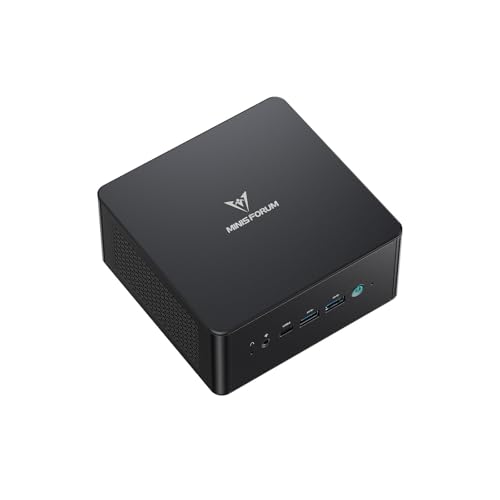
The UM890 Pro is built for desks that run several screens at once. Its Ryzen 9 8945HS reaches 5.2 GHz across eight cores and sixteen threads, and its HDMI 2.1, DisplayPort 1.4, and two USB4 ports drive four displays together. Two M.2 2280 PCIe 4.0 slots accept up to 8TB of storage, and the DDR5 memory can grow to 96GB, so the machine scales with heavier CAD files and larger assemblies over time.
Specs
- Processor: AMD Ryzen 9 8945HS, 8 cores and 16 threads, up to 5.2 GHz
- Graphics: AMD Radeon 780M
- Memory: 32GB DDR5-5600, expandable to 96GB
- Storage: 1TB PCIe 4.0 SSD, with two M.2 2280 PCIe 4.0 slots up to 8TB
- Display: HDMI 2.1, DisplayPort 1.4, and 2 x USB4, quad display supported
- Networking: Dual 2.5G LAN
- Wireless: Wi-Fi 6E and Bluetooth 5.3
Best for: CAD drafters and developers who work across four screens and keep large project files close at hand.
Watch out for: The optional OCuLink adapter uses one of the two M.2 slots, so adding an external graphics dock removes a storage slot.
Beelink SER9 Pro

The SER9 Pro is the forward-looking pick in this guide, built around the twelve-core Ryzen AI 9 HX 370 with Radeon 890M graphics and a neural processing unit for AI-assisted tasks. Its 32GB of LPDDR5X memory and 1TB PCIe 4.0 drive sit beside a second M.2 slot, and the two slots together accept up to 8TB. Triple display output, USB4, and 2.5G Ethernet round out a machine that suits creative work with AI features woven into the workflow.
Specs
- Processor: AMD Ryzen AI 9 HX 370, 12 cores and 24 threads, up to 5.1 GHz
- Graphics: AMD Radeon 890M
- Memory: 32GB LPDDR5X
- Storage: 1TB M.2 PCIe 4.0 SSD, with dual M.2 PCIe 4.0 slots up to 8TB total
- Display: Triple display output, HDMI, DisplayPort 1.4, USB4
- Networking: 2.5G LAN
- Wireless: Wi-Fi 6 and Bluetooth 5.2
- Operating system: Windows 11 Pro
Best for: Creative work that uses AI features alongside editing, rendering, and multitasking.
Watch out for: The memory is soldered LPDDR5X, so the 32GB fitted at purchase is the memory the machine keeps.
Which One Fits Your Situation
You edit video and photos every day
Choose the GMKtec NucBox K8. Its fitted 2TB drive holds a working library without constant archiving, and the second M.2 slot takes overflow when a new project lands. The Ryzen 7 processor and Radeon 780M graphics keep timelines moving, while dual 2.5G Ethernet suits a wired desk with network storage nearby.
You draft CAD across several screens
Choose the MINISFORUM UM890 Pro. Its Ryzen 9 processor and quad display support keep drawings, reference material, and tool palettes visible at once, and the memory can grow to 96GB as assemblies get heavier. The two NVMe slots let you separate the system drive from project files, so opening a large drawing never waits on the operating system.
You run a small studio with shared storage
Choose the MINISFORUM MS-01. Its dual 10G SFP+ ports move large files across a wired network faster than any other machine here, and its three M.2 NVMe positions plus RAID support suit a desk that doubles as a storage hub. The Core i9 processor handles the multitasking that comes with that role.
You want the strongest processor in the smallest box
Choose the Beelink SER9 Pro. Its twelve-core Ryzen AI 9 HX 370 leads this guide on core count, and the neural processing unit supports AI-assisted creative tools. The Beelink SER8 is the sensible fallback here if you would rather have replaceable memory and a lower core count for lighter daily work.
Common Mistakes
- Buying a mini PC with only one NVMe slot and discovering too late that the operating system and the project files must share one drive.
- Assuming the second slot is NVMe when it is actually a SATA slot, which caps the speed of any drive fitted there.
- Choosing 16GB of memory for video editing or virtual machines, then finding the machine swapping to disk during normal work.
- Ignoring the display outputs and ending up short of a port for a second or third monitor.
- Fitting an add-on card that occupies an M.2 slot, then losing the storage expansion the machine was bought for.
Frequently Asked Questions
Do I need two NVMe drives, or is one enough?
One drive is enough for general office work and browsing, but two drives suit anyone who edits video, works with CAD, or runs virtual machines. Keeping the operating system on one drive and active projects on the second stops a full project folder from slowing down the whole system, and a second slot also gives you a simple path to a mirrored pair.
Can I add a second NVMe drive later?
Yes, on every machine in this guide. Each one has at least two M.2 2280 PCIe 4.0 slots, and the installed drive uses only one of them. Open the case, fit a compatible 2280 NVMe drive in the empty slot, and format it in Windows before moving project files across to it.
Does a second NVMe slot help with gaming?
It helps with loading times and with keeping a large game library close at hand, but it does not raise frame rates on its own. The graphics hardware decides how smoothly games run, while the second drive decides how much you can store and how quickly levels load. For gaming, pair the extra storage with a machine whose graphics suit the titles you play.
Is a mini workstation as capable as a tower?
For most desk work, yes. The machines here carry desktop-class mobile processors, fast DDR5 memory, and dual PCIe 4.0 storage in a case that fits behind a monitor. A tower still wins when you need a full-size graphics card, several internal hard drives, or heavy cooling, but a mini workstation covers editing, drafting, coding, and office work without taking over the desk.
More from Amazon
Programs that pair well with the guide above. Offers and eligibility are set by Amazon and may change.
Set up recurring deliveries of everyday items on eligible products. Terms and savings are set by Amazon.
Explore Subscribe & SaveFree shipping on eligible items, Prime Video and more. Eligible new members can start with a free trial.
Start a Prime free trialAudiobooks and podcasts to listen to on the go. Eligible new members can start with a free trial.
Try Audible freeRead from a large library of eBooks and audiobooks on any device. Check Amazon for current plans.
Explore Kindle UnlimitedAs an Amazon Associate we earn from qualifying purchases.


Write Your Review
No reviews yet. Be the first to share your experience!