

Key takeaways
- Compare the best OLED Android tablets with active pen support, from the Galaxy Tab S11 to the Tab S9, by display, stylus, battery and storage.
An OLED panel and a proper active pen rule out most Android tablets. Plenty of slates have one or the other: bright LCD tablets ship with a pen, and beautiful OLED tablets ship with no pen support at all. The short list below is where the two meet, and it is dominated by one family, because Samsung is the brand that pairs Dynamic AMOLED 2X screens with a pressure-sensitive S Pen in the box across several sizes and generations.

Active pen support means more than a rubber tip that drags across glass. A real active stylus reads pressure and tilt, rests under your palm without leaving marks, and turns the tablet into a notebook and sketchbook rather than a screen you poke at. Every tablet here includes that pen, an OLED-family display and a microSD slot. The differences that decide the purchase are screen size, generation, battery capacity and how long each model will keep receiving software updates.
As an Amazon Associate, we earn from qualifying purchases.
Quick Picks
| Product | Best for | Key point |
|---|---|---|
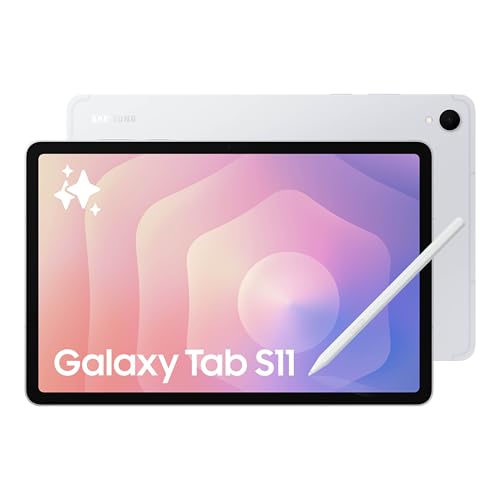
| Samsung Galaxy Tab S11 (Silver, 128GB) | Buyers who want the current model in a portable 11-inch size | Newest generation, redesigned hexagonal S Pen, longest update runway |
| Samsung Galaxy Tab S10 Ultra (Moonstone Gray, 256GB) | Split-screen work and drawing on the largest possible canvas | 14.6-inch AMOLED panel and the biggest battery in this guide |
| Samsung Galaxy Tab S10+ (Moonstone Gray, 256GB) | The middle path between portability and screen space | 12.4-inch AMOLED, 12 GB of RAM and a lighter body than the Ultra |
| Samsung Galaxy Tab S9 (Graphite, 128GB) | Pen-first buyers who want the OLED and S Pen core for less | Previous-generation flagship with the same display technology |
How to Choose
The pen is a system, not an accessory. Samsung’s S Pen uses an EMR digitiser layer in the screen, so the pen needs no pairing and no charging for writing, and it delivers pressure sensitivity, tilt recognition and palm rejection. It also means pens built for other systems, such as USI or MPP styluses, will not write on these displays. If you already own a pen from another platform, do not count on reusing it here.
Pick the screen size before anything else. The 11-inch models are the ones you hold in one hand for reading and annotating. The 12.4-inch size is the working compromise: two apps side by side stay legible, and the body still fits in a normal bag. The 14.6-inch Ultra is a desk and lap device that happens to be portable, closer to a drawing board than a reader. Choosing the wrong size is the mistake buyers feel every day, so decide this first and let it narrow the list.
Look past the OLED label. All four panels here are Dynamic AMOLED 2X with a 120Hz refresh rate, which keeps pen strokes tracking tightly under the tip. Resolution rises with size, from 2560 x 1600 on the 11-inch models to 2960 x 1848 on the Ultra. The newer generations add an anti-reflective surface that helps in bright rooms and near windows, a detail worth having if you sketch or read away from a desk lamp.
Battery capacity tracks screen size. The 11-inch tablets carry an 8,400 mAh battery, the 12.4-inch model carries 10,090 mAh, and the Ultra carries 11,200 mAh. Bigger screens draw more power, so the larger numbers do not automatically mean longer days; they mostly keep the bigger panels level with the smaller ones. Wired charging is 45 W on the Tab S9, Tab S10+ and Tab S11, and none of these tablets is sold as a wireless-charging device, so a good USB-C cable matters.
Storage fills faster than you expect. Layered drawing files, offline video and annotated PDFs grow quickly. Every model here takes a microSD card, up to 2 TB on the Tab S11 and up to 1.5 TB on the Tab S10 pair, which makes the 128 GB versions more workable than they look. If you edit video or keep a large local media library, the 256 GB versions save you from managing the card.
Software support is a real difference between generations. The Tab S11 is the current flagship and carries Samsung’s longest update commitment, quoted by Samsung at up to seven years of security updates. The Tab S9 is a 2023 model and will reach the end of its update window sooner. All four support Samsung DeX for a windowed, desktop-style layout, which is where the big screens earn their keep with a keyboard cover.
Best Options
Samsung Galaxy Tab S11 (Silver, 128GB)
The Galaxy Tab S11 is the current 11-inch flagship and the default recommendation in this guide. It pairs the Dynamic AMOLED 2X panel with the MediaTek Dimensity 9400+ processor and 12 GB of RAM, so split-screen note apps, reference images and a browser stay open together without reloading. It runs Android 16 and carries an IP68 rating, and at 5.5 mm thin it is the easiest of these tablets to carry daily.
The S Pen has been redesigned for this generation with a hexagonal body and a cone-shaped tip that sits more like a pencil in the hand. It comes in the box and needs no charging for writing. Note Assist and Drawing Assist are built in for tidying handwriting and rough sketches, and the pen works across the full 2560 x 1600 panel with the 120Hz refresh keeping ink close to the tip.
Specs
- Display 11-inch Dynamic AMOLED 2X, 2560 x 1600, 120Hz; processor MediaTek Dimensity 9400+; RAM 12 GB; storage 128 GB with microSD expansion up to 2 TB; battery 8,400 mAh; S Pen included in the box; IP68 dust and water resistance; 5.5 mm thin; Android 16; model SM-X730
Best for: Buyers who want the newest hardware, the current pen design and the longest software runway in a tablet that still works one-handed
Watch out for: The S Pen in this box has no Bluetooth, so there are no Air Actions or remote shutter tricks, and Samsung does not include a wall charger, so plan on using a 45 W USB-C charger you already own or adding one
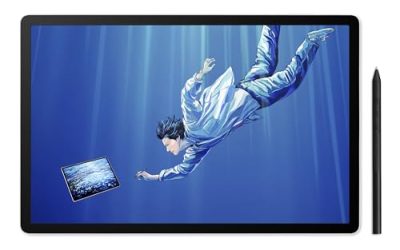
Samsung Galaxy Tab S10 Ultra (Moonstone Gray, 256GB)
The Galaxy Tab S10 Ultra is the maximalist option: a 14.6-inch Dynamic AMOLED 2X display at 2960 x 1848, driven by the MediaTek Dimensity 9300+ with 12 GB of RAM and 256 GB of storage. For drawing, storyboarding and editing timelines, the extra canvas is not a luxury; two full-size app windows sit side by side, and a sketch page shows more of the work without zooming. The listing rates the 11,200 mAh battery at up to 16 hours, and an in-screen fingerprint reader and S Pen are included.
This is a two-handed, desk-friendly machine at 718 g for the Wi-Fi model, and it behaves more like a portable drawing board than a casual reader. Samsung DeX turns it into a plausible laptop stand-in with a keyboard cover, and the anti-reflective panel keeps the big screen usable in bright rooms where a glossy slate would mirror the ceiling lights.
Specs
- Display 14.6-inch Dynamic AMOLED 2X, 2960 x 1848; processor MediaTek Dimensity 9300+; RAM 12 GB; storage 256 GB with microSD expansion up to 1.5 TB; battery 11,200 mAh, rated up to 16 hours in the listing; S Pen included; fingerprint reader; weight 718 g (Wi-Fi); Android 14; model SM-X920NZAAXAR
Best for: Artists, designers and heavy multitaskers who will use the full 14.6-inch canvas every day and mostly work at a desk or table
Watch out for: The size and weight tire your arms in handheld reading, the keyboard cover is a separate purchase, and Samsung has since moved to a newer Ultra generation, so confirm the exact listing, the seller and that the S Pen is in the box before ordering
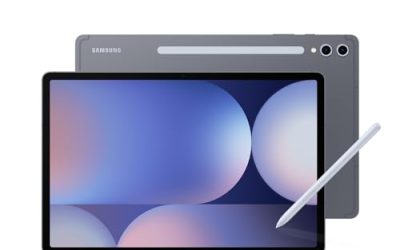
Samsung Galaxy Tab S10+ (Moonstone Gray, 256GB)

The Galaxy Tab S10+ is the balanced pick for buyers who find 11 inches cramped and 14.6 inches excessive. Its 12.4-inch Dynamic AMOLED 2X panel runs at 2800 x 1752 and 120Hz, with the same Dimensity 9300+ processor, 12 GB of RAM and 256 GB of storage as the Ultra. At 571 g for the Wi-Fi model it is meaningfully easier to hold, and the 10,090 mAh battery is the same capacity Samsung fitted to the previous Plus generation, with 45 W wired charging.
Because Samsung did not release a Plus model in the Tab S11 line, the Tab S10+ remains the current 12.4-inch option with an AMOLED panel and an in-box S Pen. It carries an IP68 rating, the anti-reflective display surface and the full Galaxy AI feature set, and it is the size that suits split-screen study notes, sheet music and magazine-format reading best.
Specs
- Display 12.4-inch Dynamic AMOLED 2X, 2800 x 1752, 120Hz; processor MediaTek Dimensity 9300+; RAM 12 GB; storage 256 GB with microSD expansion up to 1.5 TB; battery 10,090 mAh; 45 W wired charging; weight 571 g (Wi-Fi); IP68 dust and water resistance; S Pen included in the box; model SM-X820NZAAXAR
Best for: Students and professionals who want a larger canvas than the 11-inch models without committing to the Ultra’s size and weight
Watch out for: The S Pen rides in a magnetic strip on the back panel, so a case with a dedicated pen slot is worth adding before the tablet goes in a bag, and 256 GB is the sensible floor if you work with video
Samsung Galaxy Tab S9 (Graphite, 128GB)

The Galaxy Tab S9 is the value route into this category. It is a 2023 flagship with the same display formula as the newer models: an 11-inch Dynamic AMOLED 2X panel at 2560 x 1600 and 120Hz, an S Pen in the box, IP68 sealing and an 8,400 mAh battery with 45 W wired charging. The Snapdragon 8 Gen 2 processor and 8 GB of RAM still handle note-taking, drawing apps and media without hesitation, and at 498 g it is the lightest tablet in this guide.
What you give up against the Tab S11 is time and refinement rather than the core experience. The update window is shorter because the model is two generations old, the anti-reflective coating and the newest Galaxy AI tools sit with the newer lines, and the base 128 GB of storage asks you to lean on the microSD slot sooner. For a buyer whose priority is handwriting and sketching on an OLED screen, those are fair trades.
Specs
- Display 11-inch Dynamic AMOLED 2X, 2560 x 1600, 120Hz; processor Snapdragon 8 Gen 2; RAM 8 GB; storage 128 GB with microSD expansion; battery 8,400 mAh; 45 W wired charging; weight 498 g; IP68 dust and water resistance; S Pen included in the box; model SM-X710NZAAXAR
Best for: Pen-first buyers who want the AMOLED and S Pen combination in its lightest, most affordable flagship form
Watch out for: It is a 2023 model, so its remaining software update window is the shortest here, and you should confirm the listing is the US version, model SM-X710, rather than an imported variant
Which One Fits
Pick the Galaxy Tab S11 if you are buying once and keeping it for years: it has the current processor, the redesigned pen and the longest update support, in the size most people actually carry. Pick the Galaxy Tab S10+ if your work lives in split-screen view and the 11-inch screen feels tight, but you still want to hold the tablet for reading. Pick the Galaxy Tab S10 Ultra if the tablet is your main drawing surface or a DeX workstation and it will spend its life on a desk. Pick the Galaxy Tab S9 if handwriting and sketching on OLED are the whole point and you would rather put the savings toward a keyboard cover, a case and a microSD card.
Common Mistakes
Buying an FE model by accident. The Galaxy Tab S9 FE, Tab S10 FE and Tab S10 FE+ are LCD tablets, not OLED. The names sit one letter away from the AMOLED models in this guide, so read the display line of the listing, not just the product name.
Assuming a stylus you own will work. These screens use Samsung’s EMR pen system. A USI pen from a Chromebook or an MPP pen from a Windows convertible will not register. The good news is that every tablet here includes its pen, so there is nothing extra to buy on day one.
Choosing the Ultra for handheld reading. A 14.6-inch, 718 g tablet is a wonderful drawing board and a tiring book. If most of your use is reading and annotating in an armchair, the 11-inch models will make you happier.
Forgetting the charger. Samsung’s recent flagship tablets assume you own a USB-C charger. Check what is in the box on the listing you buy from, and make sure your charger can deliver 45 W if you want the fastest wired charging these models support.
Filling internal storage with art files. Layered illustrations and exported video eat space quietly. Either step up to 256 GB or keep a microSD card installed from the beginning, rather than migrating a full tablet later.
FAQ
Do all of these tablets include the pen in the box?
Yes. Each listing in this guide is for a Galaxy Tab with the S Pen included, which is one reason Samsung dominates the category: on most rival tablets the active pen is a separate purchase, if one exists at all.
What does an active pen add over a basic capacitive stylus?
Pressure sensitivity, so line weight follows how hard you press; tilt detection for shading; and palm rejection, so you can rest your hand on the screen while writing. A capacitive stylus offers none of that and behaves like a fingertip.
Can I use one S Pen across several of these tablets?
For writing and drawing, S Pens work across Galaxy Tab models because they share the same EMR system. Feature extras vary by generation: the Tab S11’s pen has no Bluetooth functions, while the Tab S9 and Tab S10 generation pens support Bluetooth gestures, so match the pen to the features you expect.
Is OLED worth choosing over the cheaper FE tablets for notes and drawing?
For pen work, yes, in most cases. OLED gives true blacks and higher contrast, which makes ink and fine line work easier to read, and the flagship models pair the panel with a 120Hz refresh rate that keeps the stroke under the pen tip. The FE line’s LCD panels are fine screens, but they are a different product tier.
Final Verdict
The Galaxy Tab S11 is the tablet most buyers should choose: current hardware, the redesigned S Pen, an 11-inch AMOLED panel and the longest software support. Step up to the Galaxy Tab S10+ for a bigger working canvas that stays holdable, or to the Galaxy Tab S10 Ultra if the screen is your desk. The Galaxy Tab S9 remains a smart buy for pen-first users who want the same display technology and in-box S Pen from a lighter, older flagship. Whichever you pick, confirm the display line, the model number and the in-box pen on the listing before you order.
More from Amazon
Programs that pair well with the guide above. Offers and eligibility are set by Amazon and may change.
Set up recurring deliveries of everyday items on eligible products. Terms and savings are set by Amazon.
Explore Subscribe & SaveFree shipping on eligible items, Prime Video and more. Eligible new members can start with a free trial.
Start a Prime free trialAudiobooks and podcasts to listen to on the go. Eligible new members can start with a free trial.
Try Audible freeRead from a large library of eBooks and audiobooks on any device. Check Amazon for current plans.
Explore Kindle UnlimitedAs an Amazon Associate we earn from qualifying purchases.



Write Your Review
No reviews yet. Be the first to share your experience!