

Key takeaways
- OLED Android tablets with a real stylus for handwritten notes, compared by screen size, S Pen in the box, storage and resolution from the Amazon listings.
Handwriting on a tablet only feels natural when three things line up at once: a screen that stays readable under room light, a pen that comes in the box rather than as a separate hunt, and enough writing area that your hand is not constantly scrolling. Shoppers who skip one of those checks often end up with a bright display and no pen, or a pen paired with a panel that was never OLED in the first place.


This guide is for students building lecture notes, professionals marking up documents in meetings, and journal keepers who want paper habits on a digital page. Every model below was picked from the names and specifications printed on its Amazon product page, and each one is an Android tablet with an OLED-family display and stylus support stated on that listing.
Quick Picks
As an Amazon Associate we earn from qualifying purchases.
| Product | Best for | Key spec from title |
|---|---|---|
| Samsung Galaxy Tab S10+ Plus 12.4 Inch 256GB Android Tablet | Note-takers who want a large page without going to the biggest size | AMOLED 2X Display, S Pen for Note-Taking |
| Samsung Galaxy Tab S9 11 Inch 128GB Android AI Tablet | Carrying one tablet between classes or sites all day | AMOLED Screen, S Pen Included |
| Samsung Galaxy Tab S11 Ultra Ai WiFi Model 14.6 Inch | Split-screen notes beside a document or textbook page | 14.6 Inch Screen, with S Pen |
| Samsung Galaxy Tab S11 128GB WiFi Android Tablet (Renewed) | A smaller OLED writing tablet on the Renewed route | S Pen for Note-Taking, US Version |
How to Choose
Confirm the Panel Is Really OLED Before Anything Else
Panel wording is where this category misleads most often, because several well-known Android tablets with pens use LCD screens instead. Look for AMOLED, Dynamic AMOLED 2X, or OLED printed in the display field of the listing itself, not just a bright product photo. For example, the Galaxy Tab S10+ listing names its display type as AMOLED, and the Galaxy Tab S11 listing names OLED. If the display field says LCD or IPS, the tablet may still write well, but it does not meet the condition this guide is built around, no matter how the headline reads.
Check That a Pen Is in the Box, Not Just Supported
Support and inclusion are different promises. A listing can say a tablet works with a stylus while shipping without one, which leaves you matching a pen model after the fact. Safer listings state the pen plainly: the Tab S9 page lists S Pen among its included items, and the Tab S10+ page lists S-Pen in its built-in media. Read the box contents line before ordering, and note whether the pen named is the one your handwriting app expects, since note apps that rely on pressure and palm handling depend on the pen the maker designed for that screen.
Match Screen Size to How You Actually Write
Writing area changes your posture more than any other specification. An 11 inch screen suits one notebook page at a time and travels easily in a small bag, which is why the Tab S9 and Tab S11 sit at that size. A 12.4 inch screen gives margin notes and diagrams more breathing room, while a 14.6 inch screen lets you keep a source document open beside your page. Think about your desk and bag first: a tablet that feels generous on a lecture desk can feel awkward balanced on a train tray or a site cabin table.
Weigh Storage and Memory Against Your Note Library
Handwritten notes themselves are light files, but the library around them grows: scanned worksheets, annotated PDFs, lecture recordings, and offline textbooks all compete for the same storage. The listings here range from 128GB on the Tab S9 and Tab S11 to 256GB on the Tab S10+ and Tab S11 Ultra, with memory listed at 12GB on the two larger models. If you archive years of notebooks on the device, start at the larger storage figure. If your notes sync to cloud storage each evening, the smaller figure is easier to live with.
The 4 Best Options
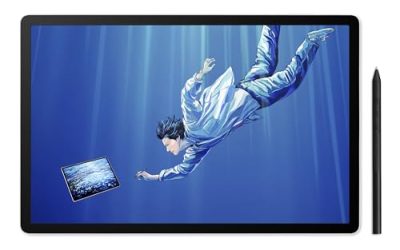
Samsung Galaxy Tab S10+ Plus 12.4 Inch 256GB Android Tablet, AMOLED 2X Display, S Pen for Note-Taking, US Version, Moonstone Gray
This size hits the middle ground that many note-takers actually need. The 12.4 inch page is wide enough for a ruled notebook view with a reference panel beside it, yet the tablet still suits a daily carry bag. Students who annotate slides and professionals who sketch process diagrams will both find the proportions workable, and the listing confirms the pen ships with the tablet rather than as an add-on decision later.
Specs
- Brand: Samsung
- Model number: SM-X820NZAAXAR
- Display: 12.4 inches, AMOLED, 2800 x 1752 pixels, 120 Hertz refresh rate listed
- Operating system: Android 14
- Memory: 12GB RAM, 256GB storage
- Processor: MediaTek Dimensity 9300 Plus
- Battery capacity: 10,090 mAh
- In the box listing: S-Pen included among built-in media
- Item weight: 1.25 pounds
Best for: Writers who want one generous page plus a side panel, without stepping up to a 14.6 inch device.
Watch out for: Confirm the color and storage variant selected on the listing, because this model family is sold in more than one configuration.
ASIN: B0D84MHZX5
Samsung Galaxy Tab S9 11 Inch 128GB WiFi Android AI Tablet, AMOLED Screen, S Pen Included, US Version, Graphite
Portability is the argument here. At 11 inches this is the tablet you can hold in one hand while standing in a corridor, a yard, or a workshop doorway, jotting a measurement or a quick list before it slips your mind. The listing names a Snapdragon processor and an AMOLED screen, and it states the S Pen is included, so the handwriting setup is complete from the box. It suits students moving between rooms and field workers who record notes on the move.
Specs
- Brand: Samsung
- Model number: SM-X710NZAAXAR
- Display: 11 inches, AMOLED, 2560 x 1600 pixels
- Display type named on listing: Dynamic AMOLED 2X, 120 Hertz
- Processor: Snapdragon 8 Gen 2
- Storage: 128GB
- Stylus: S Pen included, listed in box contents
- Series: Galaxy Tab S9, 2023 US Version
Best for: Note-takers who carry their tablet all day and write in short bursts between locations.
Watch out for: Storage is the smaller figure in this guide, so check how much of your archive you plan to keep stored on the device itself.
ASIN: B0C4BC6R95
Samsung Galaxy Tab S11 Ultra Ai WiFi Model, 14.6 Inch 11600 mAh Dual Camera with S Pen, Gray, 256GB and 12GB
Choose this one when your notes share the screen with something else. The 14.6 inch display leaves room for a textbook page on one side and your handwriting on the other, a layout that cramped tablets make frustrating. The listing names an AMOLED display type, a dual camera arrangement, and S Pen among its special features, with Note Assist also named. It fits desk-based study, design markups, and anyone whose handwritten page is really a working document rather than a quick jot.
Specs
- Brand: Samsung
- Model name: Galaxy Tab S11 Ultra
- Model number: SM-X930NZAAGTO listed
- Display: 14.6 inches, AMOLED, 2960 x 1848 pixels
- Memory: 12GB RAM, 256GB storage
- Battery: 11,600 mAh named in the listing title
- Cameras listed: front 12MP ultra-wide, rear 13MP plus 8MP ultra-wide
- Compatible devices listed: Keyboard, S Pen
- Special features listed: S Pen, Drawing Assist, Note Assist
Best for: Desk study and document markup where notes sit beside source material on one wide screen.
Watch out for: Measure your bag and desk before ordering, because a 14.6 inch tablet is a deliberate size commitment, not a casual carry.
ASIN: B0FQKSCX2D
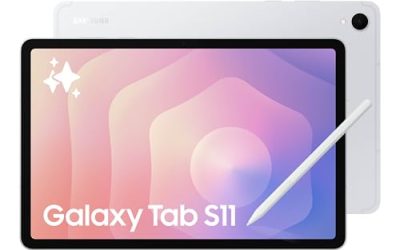
Samsung Galaxy Tab S11 128GB WiFi Android Tablet, S Pen for Note-Taking, AI Assist, US Version, Silver (Renewed)
This listing is the compact route into the newer Tab S11 line, sold through the Renewed channel. The page names an OLED display type at 11 inches, lists S-Pen among the built-in media, and describes the pen as made for note-taking. It makes sense for a buyer who wants the smaller writing size and the current model name, and who is comfortable with a Renewed device as long as the listing condition is read carefully before ordering.
Specs
- Brand: Samsung
- Model name: Galaxy Tab S11
- Display: 11 inches, OLED named on listing, 2560 x 1600 pixels
- Storage: 128GB
- Built-in media listed: Data Cable, Ejection Pin, Galaxy Tab S11, Quick Start Guide, S-Pen
- Compatible devices listed: S Pen, Data Cable
- Video capture resolution listed: 4K UHD 2160p
- Condition named on listing: Renewed, US Version, Silver
Best for: Buyers who want an 11 inch OLED note tablet from the Tab S11 line and accept a Renewed listing.
Watch out for: Read the Renewed condition wording on the listing closely and confirm exactly what is included before you order.
ASIN: B0G2482PQ8
Which One Fits Your Situation
You Fill Lecture Notebooks Week After Week
Pick the Galaxy Tab S10+ in the 12.4 inch size. A full notebook page view leaves space for margin comments without shrinking your handwriting, and the 256GB storage listed holds a long archive of annotated slides. The S Pen is listed in the box contents, so your setup is complete on day one rather than after a second order.
Your Notes Happen Standing Up or Between Rooms
The Galaxy Tab S9 is the practical answer. Its 11 inch screen and lighter carry suit quick lists, measurements, and corridor conversations that turn into action points. You give up some writing width compared with the larger models, yet you gain a tablet that is easy to hold in one hand while the pen works in the other, which is exactly how this kind of note-taking happens.
You Study With a Book Open Beside Your Page
Look at the Galaxy Tab S11 Ultra. The 14.6 inch AMOLED screen is the only one here that comfortably holds a source page and a writing page side by side, and the listing names Note Assist among its features. It is a desk decision more than a travel one, so choose it when most of your writing happens in one settled place.
You Want the Newer Small Model and Accept Renewed
The Renewed Galaxy Tab S11 listing fits that brief. You get the 11 inch size, an OLED display type named on the page, and an S-Pen listed among the built-in media. The trade is condition: read the Renewed wording on the listing with care, confirm the included items match the page, and only then treat it as equivalent to the other options here.
Common Mistakes
- Assuming every pen tablet from a familiar brand uses OLED, when several popular pen models ship with LCD panels instead.
- Reading stylus support as stylus included, then discovering the box contains no pen and a separate purchase is needed.
- Choosing the largest screen for handwriting comfort, then leaving it at home because it no longer fits the daily bag.
- Ignoring storage until a library of annotated documents, scans, and recordings fills the smaller capacity.
- Overlooking the condition wording on a Renewed listing and expecting the same presentation as a new device.
Frequently Asked Questions
Does an OLED screen change how handwriting feels?
The pen feel comes from the pen and the screen surface working together, while OLED changes what you see: contrast, black depth, and readability of fine strokes on dark or light page backgrounds. On these listings the display type is named as AMOLED or OLED, so check that field rather than judging from product photos, which can make any panel look richer than it is.
Why do some Android tablets with pens not belong in this guide?
Because a pen alone is not the condition. Several Android tablets include a stylus but use LCD panels, and this guide only covers models whose Amazon listing names an OLED-family display. That is why the familiar FE editions do not appear here: their listings describe a different panel type, even though their handwriting features are otherwise similar to the models included.
Is a bigger tablet always better for handwritten notes?
Not automatically. A 14.6 inch screen helps when notes sit beside a document, but it is harder to hold for quick jotting and takes more desk space. An 11 inch model suits standing notes and small bags. Match the size to where the writing happens most often, using the dimensions and weight printed on each listing as your guide.
What should I check on the listing right before ordering?
Confirm four lines: the display type field says AMOLED or OLED, the box contents name the S Pen, the storage figure matches the variant you selected, and the condition wording is clear if the listing is Renewed. Those four checks, all visible on the product page, prevent nearly every disappointment this category produces.
More from Amazon
Programs that pair well with the guide above. Offers and eligibility are set by Amazon and may change.
Set up recurring deliveries of everyday items on eligible products. Terms and savings are set by Amazon.
Explore Subscribe & SaveFree shipping on eligible items, Prime Video and more. Eligible new members can start with a free trial.
Start a Prime free trialAudiobooks and podcasts to listen to on the go. Eligible new members can start with a free trial.
Try Audible freeRead from a large library of eBooks and audiobooks on any device. Check Amazon for current plans.
Explore Kindle UnlimitedAs an Amazon Associate we earn from qualifying purchases.



Write Your Review
No reviews yet. Be the first to share your experience!