

Key takeaways
- Small gaming desktops that can push high refresh rates without a full tower. Compare compact PCs on GPU, CPU, memory, cooling and size before you buy.
High-refresh-rate gaming in a small case is a trade-off between frame output and heat. A compact desktop has to push 144 frames per second or more through a graphics card squeezed into a few liters of chassis, and the same box that saves desk space also traps warm air. That makes the choice less about raw specifications on a page and more about which machine keeps its graphics card fed with cool air while your monitor runs at full speed. Pick the wrong balance and the frame rate dips exactly when a match gets busy.


This guide is for competitive players chasing smooth motion in shooters, for anyone gaming at a small desk or in a dorm room, and for living-room players who want a PC that disappears beside the television. The four desktops below were chosen from their names and specifications on their Amazon listings: two mini PCs with dedicated graphics, one liquid-cooled compact tower, and one small HP tower built around current-generation hardware.
Quick Picks
As an Amazon Associate we earn from qualifying purchases.
| Product | Best for | Key spec from title |
|---|---|---|
| MINISFORUM AtomMan G1 Pro | High-refresh 1440p gaming from a 3.8-liter box | Ryzen 9 8945HX, RTX 5060, 32GB DDR5, 1TB SSD |
| ASUS ROG NUC 970 | A 2.5-liter mini PC for a tidy desk setup | Core Ultra 9 185H, RTX 4070, 32GB DDR5, 1TB SSD |
| Corsair ONE i500 | Quiet, liquid-cooled power for a shared room | Core i7-14700, RTX 4070 Super, 32GB DDR5, 1TB SSD |
| HP OMEN 16L | A compact tower with room to grow | Ryzen 7 8700F, RTX 5060, 32GB DDR5, 1TB SSD |
How to Choose
Match the graphics card to your monitor’s refresh rate
A monitor that refreshes at 144Hz or 240Hz only shows its advantage when the graphics card can deliver frames at a similar pace, so start with the pairing rather than the case. In competitive shooters at 1080p, a card in the RTX 5060 or RTX 4070 class has enough headroom to hold high frame rates with settings turned down, while 1440p at high refresh rates asks more of the card and benefits from the stronger end of that range. Check the display outputs too: a machine with DisplayPort gives you the simplest route to the highest refresh rates. If your monitor tops out at 144Hz, there is no reason to chase a card built for far more.
Check the chassis volume and the cooling design
Small-form-factor covers a wide range, from a 2.5-liter mini PC that hides behind a monitor to a 16-liter tower that still fits on a desk shelf, and the cooling inside changes with that size. Tiny systems lean on dense heatsinks, laptop-style graphics hardware and carefully routed airflow, which works well until dust builds up or the vents sit against a wall. Larger compact towers fit bigger fans and, in the Corsair ONE i500, liquid cooling for the processor and graphics card, which holds temperatures steadier during long sessions. Before buying, measure the spot where the PC will live and leave a few inches of clear space around the intake and exhaust vents.
Look at memory and storage headroom
High-refresh gaming itself does not demand huge amounts of memory, but the rest of what runs alongside a game does: a voice chat app, a browser with a dozen tabs, streaming software and the game together can push a lightly equipped machine into stuttering. All four desktops in this guide ship with 32GB of DDR5 memory, which leaves room for that background load without forcing you to close programs before every match. Storage matters differently, because modern games are large and a full drive slows updates and level loads. A 1TB solid-state drive holds a reasonable rotation of titles, and a second M.2 slot, where fitted, lets you add capacity later instead of deleting games to make room.
Weigh ports, connectivity and upgrade paths
A compact PC earns its place on a small desk only if it connects cleanly to everything around it, so count the ports before you commit. Thunderbolt 4 on the ROG NUC 970 suits a single-cable dock for a monitor and peripherals, while 5Gb Ethernet on the AtomMan G1 Pro helps wired latency. Wi-Fi 6E or Wi-Fi 7 keeps wireless play stable where running a cable is awkward. Upgrade paths vary just as much: some mini PCs let you swap memory and storage but not the graphics card, while a small tower such as the OMEN 16L accepts standard memory and storage upgrades more readily. Decide now whether you will open the case in two years or replace the machine.
The 4 Best Options
MINISFORUM AtomMan G1 Pro
The AtomMan G1 Pro is the strongest argument that a genuinely small PC can still drive a high-refresh monitor, because it pairs a 16-core Ryzen 9 processor with a desktop RTX 5060 graphics card inside a 3.8-liter chassis. That combination suits players who want 1080p or 1440p gaming at high frame rates without giving a whole desk to a tower, and the 32GB of memory means streaming or voice chat running beside the game does not drag performance down. It fits a living-room cabinet, a dorm desk or a bedroom setup where a full-size case would dominate the room.
Specs
- AMD Ryzen 9 8945HX processor, 16 cores and 32 threads, up to 5.4GHz
- NVIDIA GeForce RTX 5060 graphics, 8GB GDDR7, 145W
- 32GB DDR5 memory
- 1TB SSD storage
- 3.8-liter chassis with two M.2 PCIe 4.0 slots
- 5Gb Ethernet and Wi-Fi 7
Best for: Players who want high-refresh 1440p gaming from the smallest capable box in this guide.
Watch out for: Confirm the exact configuration on the listing before ordering, since Minisforum sells the G1 Pro in more than one memory and storage combination.
ASUS ROG NUC 970
At 2.5 liters, the ROG NUC 970 is the smallest machine here, closer in size to a games console than a desktop, yet it carries a discrete RTX 4070 graphics card and a Core Ultra 9 processor. That makes it a natural fit for a tidy desk where the PC sits beside the monitor or behind it on the included vertical stand, and the Thunderbolt 4 port keeps a docked setup to a single cable. It suits players who value a clean, minimal workspace and are happy to trade some upgrade freedom for a footprint that almost disappears.
Specs
- Intel Core Ultra 9 185H processor
- NVIDIA GeForce RTX 4070 discrete graphics
- 32GB DDR5 RAM, 5600 MHz
- 1TB PCIe Gen4 NVMe SSD
- 2.5-liter chassis with vertical stand included
- Thunderbolt 4, Intel Killer Wi-Fi 6E and Bluetooth 5.3
- Windows 11 with ARGB lighting
Best for: A minimal desk setup where the PC needs to stay out of sight while still driving a high-refresh monitor.
Watch out for: The compact chassis leaves little room for later graphics upgrades, so treat the RTX 4070 as the card you will keep for the life of the machine.
Corsair ONE i500
The Corsair ONE i500 takes the opposite approach to smallness: a compact tower that spends its internal space on liquid cooling for both the processor and the graphics card, so sustained frame rates stay steadier during long sessions. The RTX 4070 Super and Core i7-14700 pairing handles 1440p high-refresh gaming comfortably, and the 32GB of DDR5 memory covers streaming, editing and heavy multitasking beside the game. It is the pick for a shared room or a home office where fan noise matters as much as frame rates, and where the PC itself is part of the room rather than hidden away.
Specs
- Intel Core i7-14700 processor
- NVIDIA GeForce RTX 4070 Super graphics
- 32GB Vengeance DDR5 memory
- 1TB M.2 SSD storage
- Liquid cooling for the processor and graphics card
- Windows 11 Home
Best for: Long gaming sessions in a shared space where steady cooling and lower fan noise matter.
Watch out for: Check the listing’s availability and configuration carefully, since Corsair sells the ONE i500 in several finishes and processor combinations under the same model name.
HP OMEN 16L
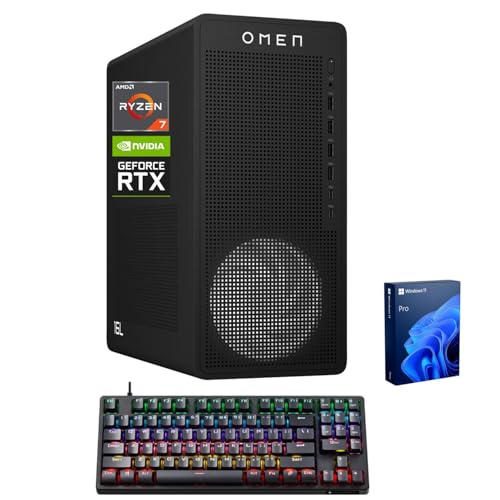
The OMEN 16L is the most conventional desktop in this group, a compact tower of about 16 liters that still fits easily on or under a desk while leaving room for standard memory and storage upgrades. Its Ryzen 7 8700F processor and RTX 5060 graphics card make a balanced pairing for 1080p and 1440p high-refresh play, and the 32GB of DDR5 memory means the machine doubles as a capable work or study PC. The small footprint suits a first gaming desktop, a family room or a bedroom where the owner may want to add a second drive or more memory later.
Specs
- AMD Ryzen 7 8700F processor
- NVIDIA GeForce RTX 5060 graphics, 8GB GDDR6
- 32GB DDR5 RAM
- 1TB SSD storage
- Dimensions 13.26 x 6.1 x 12.12 inches, weight 13.9 pounds
- Two memory slots, expandable to 64GB
- Windows 11 Pro
Best for: A first compact gaming desktop where future memory and storage upgrades matter.
Watch out for: This Amazon listing is sold as a bundle with a gaming keyboard, so check the full listing title to confirm exactly what arrives in the box.
Which One Fits Your Situation
You play competitive shooters at 1080p on a small desk
Pick the ASUS ROG NUC 970. Its RTX 4070 graphics card has the headroom to hold high frame rates in competitive titles at 1080p, and the 2.5-liter chassis leaves the desk clear for a large mouse pad and a low-sensitivity arm sweep. Thunderbolt 4 keeps the cabling to a single dock connection, which matters when every inch of desk is already spoken for.
You want 1440p high-refresh gaming in the living room
Pick the MINISFORUM AtomMan G1 Pro. The desktop RTX 5060 at full power, paired with 32GB of memory, handles 1440p at high refresh rates in a box small enough to sit beside a television or inside a media cabinet. Its 3.8-liter size and quiet profile suit a shared room far better than a tower with glowing panels and exposed fans.
You game for hours in a shared room and hate fan noise
Pick the Corsair ONE i500. Liquid cooling for both the processor and the graphics card keeps temperatures steadier and fan speeds lower during long sessions, while the RTX 4070 Super holds 1440p frame rates without strain. It is the most living-room-friendly of the towers here, built to sit in the open rather than hide under a desk.
You want a compact PC that can grow with you
Pick the HP OMEN 16L. Its tower layout accepts standard memory and storage upgrades, with two memory slots expandable to 64GB, so adding a second drive or more memory later is straightforward. The Ryzen 7 and RTX 5060 combination is strong enough for high-refresh play now, and the upgrade path means the machine does not become disposable the first time a game library outgrows its drive.
Staying Safe With a Compact Gaming Desktop
A small gaming desktop packs a powerful graphics card and processor into tight quarters, so airflow is a safety matter as well as a performance one. Leave clear space around the intake and exhaust vents, keep the case off carpet and bedding, and clean dust from the vents regularly so heat can escape. Use only the power cable supplied with the machine, plug it directly into a wall outlet or a good-quality surge-protected strip, and keep drinks away from the case. Switch the machine off and unplug it before opening any panel or moving it, and let it cool down first if it has been running a demanding game.
Common Mistakes
- Buying for the graphics card alone and ignoring the chassis: a strong card in a choked case throttles, so ventilation and cooling design decide the frame rate you actually get.
- Matching a 240Hz monitor to a card that can only sustain half that rate in your games, then blaming the monitor for motion that never smooths out.
- Blocking the vents by pushing a mini PC against a wall or into a closed cabinet, which traps heat and forces the fans to run constantly.
- Filling a 1TB drive with a large game library and leaving no free space, which slows updates, level loads and background tasks.
- Assuming every model with the same name has the same parts: these compact PCs ship in several configurations, so verify the processor, graphics card, memory and storage on the listing before ordering.
Frequently Asked Questions
Can a small-form-factor desktop really drive a 144Hz or 240Hz monitor?
Yes, provided the graphics card is strong enough for the resolution and settings you use. A card in the RTX 5060 or RTX 4070 class can hold high frame rates in games at 1080p, and at 1440p with adjusted settings. The monitor’s refresh rate is a ceiling, not a guarantee: the PC still has to produce the frames, so pair the display with a machine whose graphics hardware matches it.
Is a laptop graphics card in a mini PC a drawback for high-refresh gaming?
Not necessarily, but know which kind of card you are buying. The ROG NUC 970 uses a laptop-class RTX 4070, while the AtomMan G1 Pro fits a desktop RTX 5060, and the two behave differently under sustained load. A laptop card in a well-cooled 2.5-liter box can still drive a high-refresh monitor in competitive titles, but it will not match a desktop card of the same name in demanding games.
How much memory and storage should a high-refresh gaming desktop have?
For most players, 32GB of DDR5 memory is the comfortable level: it leaves room for the game, voice chat, a browser and streaming software to run together without stuttering. Storage is a separate question, because modern games are large; a 1TB solid-state drive holds a reasonable rotation, and a second M.2 slot or an upgrade path matters once the library grows beyond that.
Do small gaming desktops run hot and loud?
They can, because the same components that fill a tower are squeezed into far less air, but the better designs manage it with dense heatsinks, directed airflow or liquid cooling. Fan noise rises most when vents are blocked or dust builds up, so placement and cleaning matter as much as the design itself. If quiet running is a priority, favour a liquid-cooled compact tower over the smallest mini PC.
More from Amazon
Programs that pair well with the guide above. Offers and eligibility are set by Amazon and may change.
Set up recurring deliveries of everyday items on eligible products. Terms and savings are set by Amazon.
Explore Subscribe & SaveFree shipping on eligible items, Prime Video and more. Eligible new members can start with a free trial.
Start a Prime free trialAudiobooks and podcasts to listen to on the go. Eligible new members can start with a free trial.
Try Audible freeRead from a large library of eBooks and audiobooks on any device. Check Amazon for current plans.
Explore Kindle UnlimitedAs an Amazon Associate we earn from qualifying purchases.





Write Your Review
No reviews yet. Be the first to share your experience!