

Key takeaways
- Compare the best 15-inch mobile workstations for 3D rendering: professional NVIDIA GPUs, ISV-certified platforms and 15.6-inch displays from Dell and Lenovo.
As an Amazon Associate, we earn from qualifying purchases made through links on this page.
A 15-inch mobile workstation sits in a useful middle ground for 3D work. It is large enough to house a professional graphics card, a cooling system that can hold clock speeds through a long render queue, and a screen you can model on without an external monitor, yet it still fits in a standard laptop bag for site visits, client meetings, and work away from the studio. For rendering specifically, the buying decision is dominated by the graphics processor and its video memory, because engines such as Blender Cycles, V-Ray, Redshift, and Arnold lean on the GPU for viewport navigation and final-frame output, while the CPU still matters for scene preparation, simulation baking, and the applications that remain processor-bound.
This roundup covers three 15.6-inch mobile workstations from Dell and Lenovo, the two vendors with the deepest catalogues in this class. Every model below pairs a professional NVIDIA GPU with workstation drivers and independent software vendor certification programmes, which is what separates a mobile workstation from a gaming laptop with similar headline specifications. The three picks span two hardware generations and three GPU tiers, from an entry-level Ada generation card with 6GB of video memory to an Ampere generation card with 8GB, so the right choice depends on the size of your scenes, the resolution of your texture sets, and how much of your pipeline runs on the GPU alone. Specifications below are drawn from manufacturer documentation and the exact retail configurations tied to each listing.
What to look for in a 15-inch mobile workstation for 3D rendering
Graphics card and video memory. The GPU is the single most important component for GPU rendering. Professional NVIDIA RTX cards use workstation drivers that are validated against applications such as Autodesk Maya, 3ds Max, SolidWorks, and Cinema 4D, and they support the OptiX and CUDA render paths that production engines rely on. Video memory sets a hard ceiling on scene complexity: when a scene, its textures, and its render buffers exceed the available VRAM, GPU renderers either fail or fall back to much slower system memory. For moderate scenes and product visualisation, 6GB is workable; for dense environments, high-resolution texture sets, or GPU compositing, 8GB or more gives noticeably more headroom.
Processor. Look for a multi-core H-series or equivalent performance-class CPU. Core count drives CPU render buckets, physics and fluid simulation bakes, mesh processing, and general responsiveness while a render runs in the background. Single-core speed still matters for modelling, because viewport manipulation and many modifier operations run on one thread.
Memory and storage. Thirty-two gigabytes of system memory is a sensible floor for professional 3D work, and sixty-four gigabytes helps when large scenes, reference footage, and several applications stay open at once. A fast NVMe solid-state drive of at least 1TB keeps texture libraries, cache files, and project assets loading quickly; rendering pipelines write large intermediate files, so capacity fills faster than most buyers expect.
Display. Every workstation here uses a 15.6-inch Full HD anti-glare panel. That resolution is easy for the GPU to drive and keeps interface elements at a comfortable size, but artists who grade colour or inspect fine detail will usually pair the laptop with a calibrated external monitor. Check the port selection before relying on that plan.
Thermals, weight, and certification. Sustained rendering is a worst-case load, so chassis cooling determines how much of the rated performance you actually keep after the first minutes. Mobile workstations in this class weigh between roughly four and six pounds, and the heavier designs generally carry larger cooling assemblies. Finally, confirm that the platform carries ISV certification for your main applications; certified configurations are validated by the hardware vendor with the software vendor’s own test suites, which reduces the risk of viewport glitches and driver-related crashes in production work.
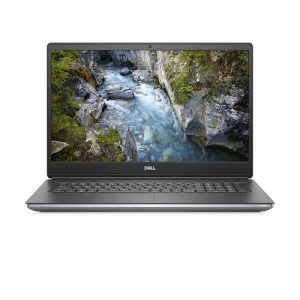
Dell Precision 3591 — the current-generation Ada platform

See the Dell Precision 3591 on Amazon
The Precision 3591 is Dell’s current 15.6-inch entry in the Precision line, and this configuration pairs Intel’s Core Ultra 7 165H processor with the NVIDIA RTX 1000 Ada Generation Laptop GPU. The processor provides sixteen cores with vPro management support, and the graphics card carries 6GB of GDDR6 video memory, which is enough for GPU-accelerated viewport work and final renders of moderate complexity in Blender, Cinema 4D, and similar tools. Dell positions the Precision family as ISV-certified workstations, and the 3591 follows that pattern with workstation drivers rather than consumer gaming drivers.
This particular configuration is generous on memory and storage: 64GB of DDR5 RAM and a 2TB PCIe NVMe solid-state drive. That combination suits artists who keep a modelling application, a texturing tool, and a render queue open simultaneously, and the storage capacity absorbs large asset libraries without constant housekeeping. The 15.6-inch Full HD IPS anti-glare display is a practical working panel, and connectivity is strong for a machine of this size: two Thunderbolt 4 ports, two USB-A ports, HDMI 2.1, wired Ethernet, Wi-Fi 6E, a backlit keyboard, a fingerprint reader, and a Full HD infrared webcam with a privacy shutter. At a listed weight of 3.96 pounds, it is also the lightest machine in this roundup, which matters if the workstation travels daily.
Who it is for: Freelancers and small-studio artists who want the newest platform, the most memory and storage, and the easiest carrying weight, and whose scenes fit comfortably within 6GB of video memory.
Limitations to know: This listing is sold by a specialist seller that opens the machine to upgrade the memory and storage, then reseals it; the listing states that the upgraded components carry a three-year warranty from the seller while the remaining components carry a one-year Dell warranty, so the support path differs from a factory-sealed Dell configuration. The RTX 1000 Ada is the entry tier of its generation, and its 6GB of VRAM will constrain very large scenes. The display is Full HD only, with a standard colour gamut, so colour-critical work calls for an external monitor.
Lenovo ThinkPad P15v Gen 3 — AMD processing with an RTX A2000

See the Lenovo ThinkPad P15v Gen 3 on Amazon
The ThinkPad P15v Gen 3 is Lenovo’s value-oriented 15.6-inch workstation, and the configuration tied to this listing (model 21EM004BUS) combines an AMD Ryzen 7 PRO 6850H processor with the NVIDIA RTX A2000 Laptop GPU and 4GB of GDDR6 video memory. The Ryzen 7 PRO 6850H is an eight-core processor from AMD’s professional line, with the remote management and security features that the PRO designation brings. The RTX A2000 supports CUDA and OptiX acceleration, so GPU renderers in Blender and other production tools can use it fully, and Lenovo sells the P15v line as an ISV-certified mobile workstation for applications including AutoCAD, SolidWorks, and Maya.
The rest of the configuration is balanced for production work: 32GB of memory, a 1TB NVMe solid-state drive, and a 15.6-inch Full HD IPS anti-glare display rated at 300 nits, which is a step up in brightness from many panels in this class and helps in bright rooms and on site. The chassis follows the traditional ThinkPad pattern, with a full keyboard including a numeric keypad, the TrackPoint pointing device alongside the touchpad, and a port selection built around USB-C, USB-A, HDMI, and Ethernet. Listed weight is 4.96 pounds, which places it in the middle of this group: heavier than the Dell, lighter than the older ThinkPad below, and still reasonable for a bag that also carries a power adapter and a portable drive.
Who it is for: Artists and engineers who prefer an AMD processor platform, want a brighter built-in panel, and work on scenes of small to moderate complexity, such as product visualisation, architectural stills at moderate resolutions, and motion graphics with modest texture loads.
Limitations to know: The 4GB of video memory on the RTX A2000 is the tightest VRAM budget in this roundup, and it is the first specification that will limit you as scenes grow; complex environments and large texture sets can exceed it and force slower rendering paths. The platform is also a generation older than the Dell, with the memory and connectivity standards of its period, so buyers planning a long service life should weigh that against the configuration’s strengths.
Lenovo ThinkPad P15 Gen 2 — the most video memory in this group

See the Lenovo ThinkPad P15 Gen 2 on Amazon
The ThinkPad P15 Gen 2 (model 20YQ003PUS) is an earlier flagship-class 15.6-inch workstation, and its headline specification remains relevant for rendering: the NVIDIA RTX A4000 Laptop GPU with 8GB of GDDR6 video memory. That is the largest VRAM allocation in this roundup, and for GPU rendering it can matter more than the newer architecture in the Dell, because a scene that fits in memory renders on the GPU at full speed while a scene that does not fit may not render on the GPU at all. The processor is Intel’s Core i7-11850H, an eight-core chip with vPro support, paired with 32GB of DDR4 memory and a 1TB NVMe solid-state drive. Retailer specification sheets for this model confirm the 15.6-inch Full HD IPS anti-glare display, and Lenovo markets the P15 line with ISV certification for professional 3D and CAD applications.
The P15 Gen 2 uses Lenovo’s full-size workstation chassis, with dual Thunderbolt 4 ports, HDMI, Ethernet, a smart card reader option in the family, and a keyboard with a numeric keypad. The design prioritises cooling capacity and serviceability over thinness, and the machine’s listed weight of roughly 5.8 pounds reflects that: it is a transportable workstation rather than an ultraportable, best suited to moving between a desk, a studio, and a client site rather than daily carry over long distances. For a rendering-focused buyer, the trade is straightforward: you accept an older processor platform and a heavier chassis in exchange for the strongest graphics memory configuration here.
Who it is for: 3D artists whose scenes regularly push past 6GB of video memory, studios standardising on a proven certified platform, and buyers who render at a desk most of the time and travel only occasionally.
Limitations to know: The platform dates from an earlier hardware generation, so the processor, DDR4 memory, and peripheral standards are a step behind the Dell. Retailer specifications list this configuration with Windows 10 Pro; Microsoft has ended standard support for Windows 10, so plan for a Windows version upgrade as part of the purchase. The weight and size also make it the least convenient option here for frequent travel.
Comparison table
| Specification | Dell Precision 3591 | Lenovo ThinkPad P15v Gen 3 | Lenovo ThinkPad P15 Gen 2 |
|---|---|---|---|
| Display | 15.6-inch Full HD IPS anti-glare | 15.6-inch Full HD IPS anti-glare, 300 nits | 15.6-inch Full HD IPS anti-glare |
| Processor | Intel Core Ultra 7 165H | AMD Ryzen 7 PRO 6850H | Intel Core i7-11850H |
| Graphics | NVIDIA RTX 1000 Ada, 6GB GDDR6 | NVIDIA RTX A2000, 4GB GDDR6 | NVIDIA RTX A4000, 8GB GDDR6 |
| Memory | 64GB DDR5 | 32GB | 32GB DDR4 |
| Storage | 2TB NVMe SSD | 1TB NVMe SSD | 1TB NVMe SSD |
| Weight | 3.96 lb (listed) | 4.96 lb (listed) | Roughly 5.8 lb |
| Windows version | Windows 11 Pro | Windows 11 Pro | Windows 10 Pro (per retailer specifications) |
| Amazon link | View | View | View |
Frequently asked questions
How much video memory does a mobile workstation need for 3D rendering?
It depends on scene size. Simple product scenes and moderate environments render comfortably in 4GB to 6GB, while dense scenes, large texture libraries, and high-resolution output can exceed 8GB. When a scene exceeds video memory, GPU renderers slow down sharply or stop, so artists with growing projects should favour the larger allocation.
Is a professional RTX card better than a gaming card for rendering?
For raw render throughput, gaming and professional cards with similar hardware perform closely. The workstation advantage is the certified driver programme: professional drivers are validated with applications such as Maya, 3ds Max, and SolidWorks, which improves viewport stability and reduces the risk of display errors in production software. That validation is the main reason to choose a mobile workstation for professional work.
Can these laptops drive an external monitor for colour work?
Yes. All three provide HDMI output, and the Dell and the P15 Gen 2 add Thunderbolt connectivity for docking stations and high-resolution external displays. Because every built-in panel here is a standard-gamut Full HD screen, a calibrated external monitor is the sensible route for colour grading and final client approval.
Does the processor still matter if rendering runs on the GPU?
Yes. The CPU handles scene loading, geometry processing, simulation baking, compositing in some pipelines, and every task outside the renderer itself. It also keeps the interface responsive while the GPU is fully occupied. A balanced configuration avoids a fast GPU waiting on a slow processor.
Conclusion
For most buyers, the Dell Precision 3591 is the natural first look: it has the newest processor platform, the largest memory and storage configuration, and the lightest chassis, and its RTX 1000 Ada card handles mainstream GPU rendering well within its 6GB of video memory. The ThinkPad P15v Gen 3 suits AMD-preferring artists with moderate scenes who value its brighter display and balanced specification. The ThinkPad P15 Gen 2 earns its place on one specification that rendering artists feel directly: 8GB of video memory on its RTX A4000, which keeps larger scenes on the GPU where they belong, provided you accept the older platform and heavier build. Match the video memory to your largest typical scene first, then choose between these three on weight, memory, and platform age.
More from Amazon
Programs that pair well with the guide above. Offers and eligibility are set by Amazon and may change.
Set up recurring deliveries of everyday items on eligible products. Terms and savings are set by Amazon.
Explore Subscribe & SaveFree shipping on eligible items, Prime Video and more. Eligible new members can start with a free trial.
Start a Prime free trialAudiobooks and podcasts to listen to on the go. Eligible new members can start with a free trial.
Try Audible freeRead from a large library of eBooks and audiobooks on any device. Check Amazon for current plans.
Explore Kindle UnlimitedAs an Amazon Associate we earn from qualifying purchases.




Write Your Review
No reviews yet. Be the first to share your experience!