

Key takeaways
- Fan-cooled and liquid-cooled Qi2 25W magnetic power banks compared: three 10,000mAh picks built to hold full wireless speed without roasting your phone.
A 25W magnetic charge sounds simple until heat enters the picture. Wireless charging at that wattage warms both the phone and the battery pack, and once temperatures climb, the phone quietly slows the charge to protect its cells. So the real decision is not which bank prints 25W on the box, because every pick below does that. It is how each one sheds heat during a long top-up, and what that cooling hardware costs you in thickness, noise, and extras.
This guide is for owners of recent iPhones and Qi2 Android phones who top up away from a wall socket, travel with one battery instead of a pouch of cables, or keep a phone running navigation or games while it charges. Every product was chosen from the specifications on its own Amazon product page, and each one had to clear the same two bars: Qi2 wireless charging at 25W, and active cooling, meaning a fan or a pumped liquid loop rather than a passive heat spreader.
Quick Picks
As an Amazon Associate we earn from qualifying purchases
| Product | Best for | Key spec from title |
|---|---|---|
| Anker MagGo 2 Pro | Long charges where you watch temperature and power live | Active cooling fan, smart display and stand, 45W max recharge |
| UGREEN MagFlow Pro | Cable-free travel with the most aggressive cooling design | Liquid-cooled Qi2 25W, built-in cable strap, 45W USB-C charging |
| SHARGE ICEMAG 3 | Desk and nightstand use with a stand and a bit of flair | Active Cooling with 10,000 rpm fan, built-in cable, transparent RGB shell |
How to Choose
Start With the Cooling Design, Not the Wattage
Active cooling comes in two forms in this small category. A fan, like the SnapCool unit in the Anker or the 10,000 rpm fan in the SHARGE, pushes air across the coil and responds quickly, but it can be heard in a quiet room and adds a moving part. A pumped liquid loop, like UGREEN’s CryoPulse system, circulates coolant past the hot components and suits people who dislike fan noise near a bed or desk. Passive graphene sheets and vent holes, which many cheaper banks advertise as cooling, only spread heat around; they do not remove it, so treat them as a different class of product.
Confirm Your Phone Can Actually Take 25W
The bank is only half of the speed equation. Full 25W magnetic charging needs a phone that supports the Qi2.2 magnetic power profile, which today means recent flagship phones; an older Qi2 phone still snaps on and charges, but it caps at 15W and gains little from the cooling hardware. Your case matters just as much. A thick or non-magnetic case weakens the alignment, and a poorly aligned coil both slows charging and generates extra heat, undoing the point of buying a cooled bank. If your case is not magnetic, plan on charging bare or by cable.
Compare the Wired Side for Turnaround Time
Wireless speed fills the phone, but wired speed decides how fast the bank itself is ready again. Look at two numbers on the listing: the USB-C output, which covers laptops, tablets, and a friend’s phone on a cable, and the input rating, which sets recharge time. The Anker refills at up to 45W and claims most of a charge in under an hour, while a bank with a modest input can sit on a charger for half a day. A built-in cable, offered by the UGREEN and the SHARGE, also removes the most commonly forgotten item from a travel kit.
Weigh the Display, Stand, and Bulk Trade-Offs
Cooling hardware, screens, and stands all take up room inside the shell, so these banks run thicker than a plain magnetic slab. Decide which extras earn their space. A smart display that shows wattage, temperature, and battery health is genuinely useful for judging whether the cooling is doing its job. A fold-out stand turns the bank into a desk companion for video calls. Decorative lighting and transparent shells add nothing to charging, but they may matter if the bank lives on your desk. Check the listed thickness against your pocket or pouch before ordering.
The 3 Best Options
Anker MagGo 2 Pro
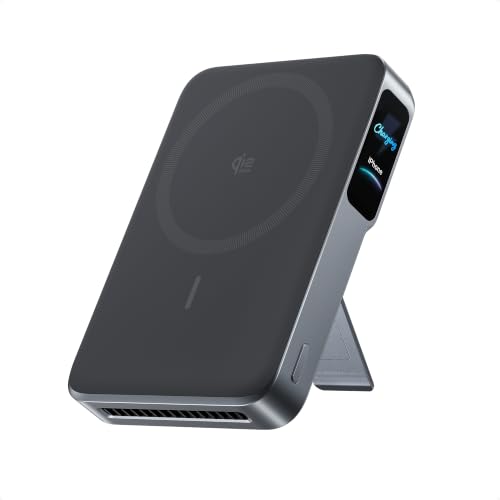
Anker’s entry is the most information-rich of the three. Its SnapCool system pairs a smart fan with dual air channels and a three-layer graphene spreader, and the listing states the charging surface stays below 96.8 degrees Fahrenheit during 25W charging. A smart display reports charging power, temperature, and battery health, so you can see the cooling work instead of trusting a badge. The fold-out stand adjusts from flat to 80 degrees for video calls, and the 45W USB-C recharge is the fastest turnaround here. It suits iPhone owners who charge for long stretches and like watching the numbers.
Specs
- Capacity: 10,000mAh
- Wireless output: Qi2.2 magnetic charging up to 25W
- Cooling: SnapCool smart fan with dual air channels and 3-layer graphene; listing states surface stays below 96.8°F
- USB-C: 45W max recharge; listing states 80 percent recharge in 52 minutes
- Display: smart display showing charging power, temperature, and battery health
- Stand: built-in, adjustable from 0 to 80 degrees
- Dimensions: 4.1 x 2.8 x 0.7 in
- Weight: 7.8 oz
- In the box: 1 ft USB-C to USB-C cable, storage pouch, welcome guide, 24-month warranty
Best for: iPhone users who charge during long sessions and want live temperature and power readouts.
Watch out for: the listing states this model is not for Android phones, so Android owners should look at the other two picks.
ASIN: B0GVYMQ3GT
UGREEN MagFlow Pro
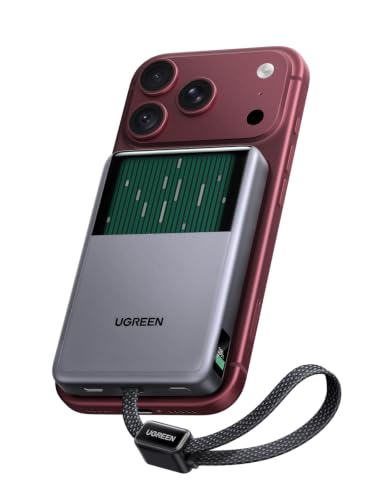
UGREEN took the cooling brief further than anyone else here. Its CryoPulse system uses a micro-pump to circulate liquid coolant past the charging components, and a small window in the shell lets you watch the coolant move. The listing claims peak temperatures well below the industry benchmark during 25W charging, which is exactly the condition that normally forces a phone to slow down. A built-in USB-C cable doubles as a carrying strap, a second USB-C port handles wired charging at up to 45W, and a display shows power, battery level, cycle count, and cooling status. There is no stand, so it is a carry-first design.
Specs
- Capacity: 10,000mAh (39.2Wh)
- Wireless output: Qi2 magnetic charging up to 25W
- Cooling: CryoPulse liquid cooling with micro-pump and visible coolant window
- Wired output: up to 45W via USB-C port and built-in USB-C cable
- Input: USB-C up to 30W
- Display: smart display showing charging power, battery level, cycle count, and cooling status
- Dimensions: 108 x 71 x 16 mm (about 4.27 x 2.78 x 0.63 in)
- Listed as airline-safe in the product title
Best for: travelers who want the strongest cooling approach and no separate cable to pack.
Watch out for: there is no kickstand, so propping the phone up for video means leaning it on something else.
ASIN: B0GYYY5CW9
SHARGE ICEMAG 3
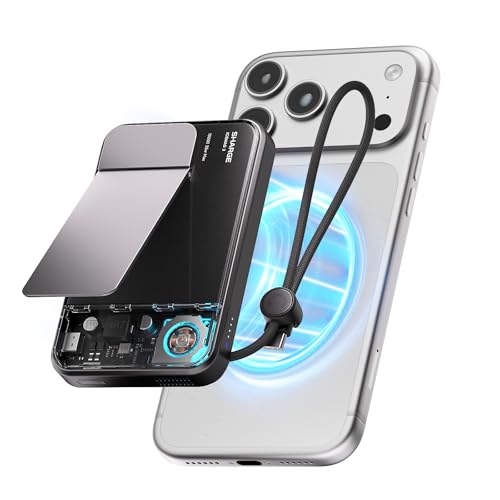
SHARGE’s bank wears its cooling on the outside. A transparent shell shows off the 10,000 rpm fan at the heart of its Active Cooling 3.0 system, ringed by RGB lighting you can switch off by holding the power button. Under the design sits a full-featured bank: 25W Qi2.2 wireless charging, a USB-C port and a built-in USB-C cable that both reach 35W, a foldable kickstand, a low-current mode for earbuds, and pass-through charging. It is the thickest of the three, which is the honest price of the fan and the showpiece housing. Pick it if your bank lives on a desk and you enjoy gear that shows how it works.
Specs
- Capacity: 10,000mAh (39.1Wh)
- Wireless output: Qi2.2 magnetic charging up to 25W
- Cooling: Active Cooling 3.0 with 10,000 rpm fan
- Wired output: USB-C port and built-in USB-C cable, up to 35W
- Stand: built-in foldable kickstand
- Design: transparent shell with RGB lighting, switchable from the power button
- Dimensions: 4.3 x 2.8 x 0.78 in
- Extras: low-current mode for small devices; pass-through charging supported
Best for: desk and nightstand charging where the stand, cable, and visible fan are part of the appeal.
Watch out for: the manufacturer notes this model does not fit the Samsung Galaxy S26 Ultra, and any fan-cooled bank is audible in a silent room.
ASIN: B0FZ9ZMF3N
Which One Fits Your Situation
You Game or Navigate While the Phone Charges
Sustained screen-on use is the worst case for heat, because the phone is generating its own warmth while the coil adds more. The Anker MagGo 2 Pro fits best here: its fan responds to temperature automatically, the display shows the charging surface temperature in real time, and the adjustable stand holds the phone at a usable angle for maps or a controller session without you gripping a hot stack.
You Travel Light and Refuse to Pack Cables
The UGREEN MagFlow Pro removes the cable question entirely, since its USB-C cable is built in and doubles as a strap. The liquid loop also keeps working silently in a hotel room or a red-eye cabin, where a fan’s hum carries. Its slim 16 mm profile slides into a jacket pocket, and the display’s cycle count is a quiet bonus for anyone who tracks battery health over years of trips.
You Want One Bank for the Desk and the Nightstand
The SHARGE ICEMAG 3 earns this spot with its kickstand and built-in cable: prop the phone for a video call, then move the whole thing to the nightstand without hunting for a lead. The RGB ring can be turned off for sleeping hours. Its fan is the most audible of the group in a quiet room, so light sleepers may prefer the UGREEN’s pump-driven loop instead.
You Need the Bank Itself Refilled Fast
Turnaround matters when the bank empties daily. The Anker’s 45W recharge, listed as reaching 80 percent in 52 minutes, gets it back into a bag over breakfast rather than overnight. The UGREEN’s 30W input is a step behind, and the SHARGE shares its 35W port between input and output. If your routine is charge the phone all day and refill the bank in the evening, the Anker’s input speed decides it.
Common Mistakes
- Assuming any Qi2 bank delivers 25W: the phone must support the 25W magnetic profile too, or charging tops out at 15W no matter what the box says.
- Buying a bank with a thick, non-magnetic case in the drawer: poor alignment wastes energy as heat and can make a cooled bank perform like a plain one.
- Confusing a cooling charging pad with a power bank: many fan-cooled Qi2 chargers plug into the wall and store no energy at all, so check for a battery capacity figure.
- Expecting 25W from empty to full: phones taper charging as they fill, so cooling mainly protects the fast early and middle stretch of the charge.
- Ignoring the input rating: a bank that takes all night to refill itself will not be ready for a morning departure, whatever its output speed.
Frequently Asked Questions
Does my phone need Qi2.2 to get the full 25W?
Yes. The 25W magnetic rate comes from the newer Qi2.2 magnetic power profile, so the phone has to support it; recent flagship iPhones and a small number of Android flagships do. An older Qi2 phone still attaches magnetically and charges from any bank here, but it negotiates the older 15W rate. Check your phone maker’s charging specifications before paying extra for the faster banks.
Does active cooling really keep charging faster for longer?
It addresses the main reason 25W charging slows down: heat building up at the coil and the phone’s back panel. Fans and pumped liquid loops move that heat away, and the listings here state surface temperatures below the point where phones typically throttle. Cooling cannot override the phone’s own taper near full, so expect the benefit in the first two-thirds of a charge.
Can these banks charge Android phones?
By cable, yes: every pick here has USB-C output that charges any phone. Magnetically, it depends. The Anker listing states its model is not for Android phones. The UGREEN and SHARGE align with Qi2 Android phones that have built-in magnets, and other Android phones need a magnetic case for a secure snap. The SHARGE also carries a manufacturer note that it does not fit the Samsung Galaxy S26 Ultra.
Can I charge two devices at the same time?
Yes. Each bank here can run its magnetic pad and a wired output together, so a phone can charge wirelessly while earbuds or a second phone use the cable. Total output is shared between the two, so neither device gets its maximum rate during simultaneous charging. For the fastest single-phone charge, unplug the second device and let the bank put its whole budget into one output.
More from Amazon
Programs that pair well with the guide above. Offers and eligibility are set by Amazon and may change.
Set up recurring deliveries of everyday items on eligible products. Terms and savings are set by Amazon.
Explore Subscribe & SaveFree shipping on eligible items, Prime Video and more. Eligible new members can start with a free trial.
Start a Prime free trialAudiobooks and podcasts to listen to on the go. Eligible new members can start with a free trial.
Try Audible freeRead from a large library of eBooks and audiobooks on any device. Check Amazon for current plans.
Explore Kindle UnlimitedAs an Amazon Associate we earn from qualifying purchases.




Write Your Review
No reviews yet. Be the first to share your experience!